What Is Instagram DM Automation?
A plain answer with Meta's own documentation attached: what Instagram DM automation is, the three things that trigger it, and what the API allows.
On this page
- How does Instagram DM automation work?
- The three things that can trigger an automated DM
- What Meta actually documents about automated DMs
- Is there an hourly DM limit on Instagram?
- Is Instagram DM automation allowed?
- Is Instagram DM automation safe for your account?
- What Instagram DM automation is not
- It is not a bot that DMs strangers
- It is not browser automation or a "ghost" logging into your account
- It is not necessarily an AI chatbot
- It is not an email tool or a broadcast blaster
- How to set up Instagram DM automation
- What it costs
- FAQ
- What is Instagram DM automation in simple terms?
- Is Instagram DM automation against Instagram's rules?
- Does Instagram DM automation get you banned?
- Do I need a coding or technical background?
- What kind of Instagram account do I need?
- Can it message people who haven't contacted me?
- Is Instagram DM automation the same as an AI chatbot?
In short:
- Instagram DM automation sends a DM automatically when someone comments a keyword, replies to your story or DMs you.
- It runs through Meta's official API and never uses your password.
- Meta allows one private reply per comment, within 7 days of the comment.
- It can't message strangers who haven't engaged with you first.
- It's often called an auto DM. See each auto DM feature with screenshots.
A Reel goes out on Tuesday. By Wednesday morning, four hundred people have commented the word GUIDE underneath it, each one wanting the link you promised.
You could open Instagram and reply to four hundred comments by hand — or something can do it for you, seconds after each comment lands. That "something" is Instagram DM automation.
This page is the definition, done properly: what it is, what makes it fire, and what Meta's own documentation says it is allowed to do.
Already know the concept? The 2026 Instagram DM automation guide is the hands-on companion. It covers building the flow, writing the message and avoiding the mistakes.
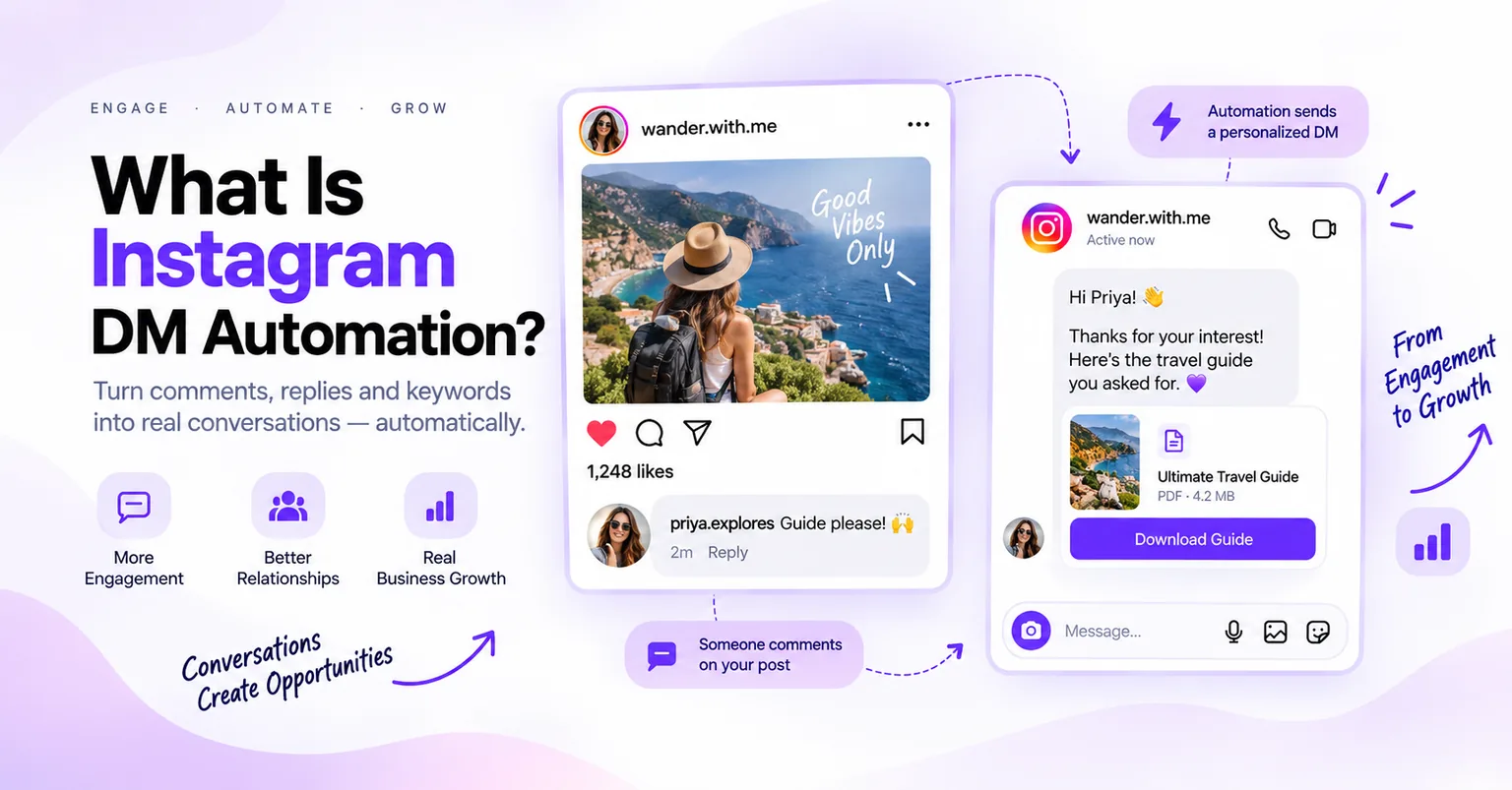
Instagram DM automation is the use of an app connected to Instagram's official API to send a direct message automatically when a person acts first. The action is a comment on a post, a story reply or a keyword DM. It does not message strangers or log into your account with your password.
How does Instagram DM automation work?
It works through Meta's official interface for businesses, not a program "using" your phone. (The full mechanics are in how Instagram DM automation works.) In summary:
- You connect a Business or Creator account through Meta's own login. The app gets a scoped access token, never your password.
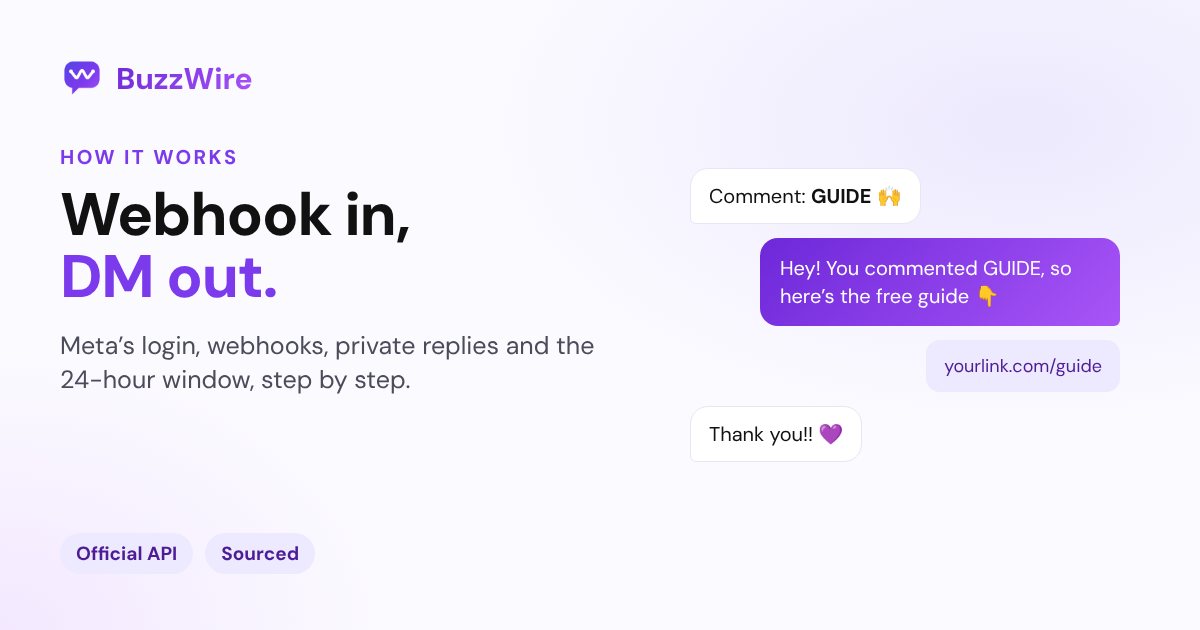
- Meta notifies the app by webhook when someone comments, replies to a story or sends a message.
- The app checks the rules, such as the keyword match and Meta's reply windows, then sends the DM through the API.
The person always moves first. That single fact is what separates automation Meta permits from the account-farming bots it bans.
The three things that can trigger an automated DM
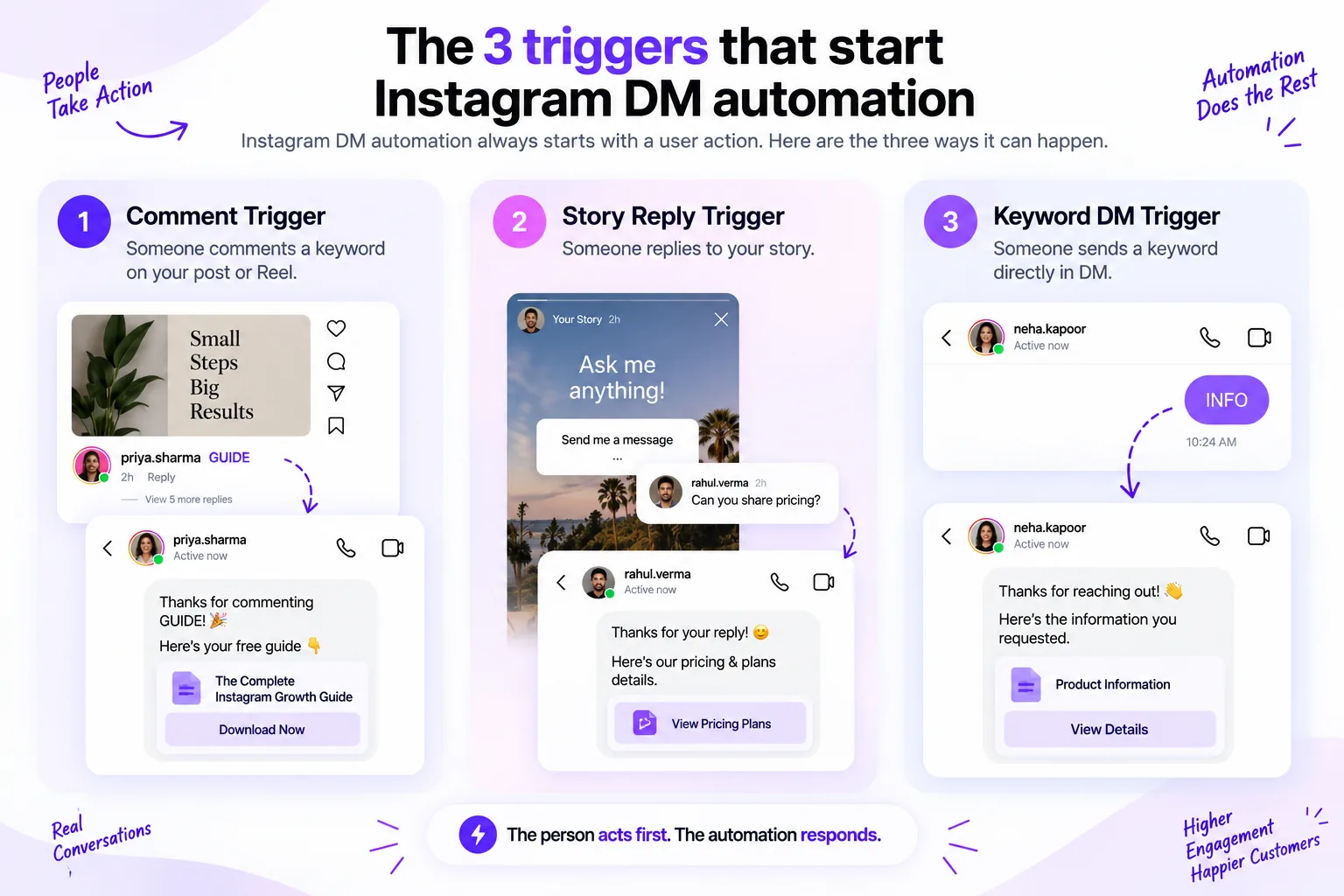
There are exactly three actions that can start an automated Instagram DM, because each one counts as the person opening a conversation with you:
- A comment on a post or Reel: the classic "comment GUIDE, get the link" mechanic. This is comment-to-DM automation, and it's what most creators mean when they say "DM automation."
- A reply to your story: someone taps back on a story with a keyword, and the DM fires. Story replies are their own trigger, kept separate from post comments.
- A DM containing a keyword: someone messages you a word directly and gets an automatic reply. This is an Instagram autoresponder, the inbox version of the same idea.
What is not on this list matters just as much: you cannot pick a stranger and have software DM them cold. Every automated first message has to answer an action the person already took.
When you do write that first message, these Instagram welcome-message examples show what a good one looks like.
What Meta actually documents about automated DMs
Most articles on this topic assert limits with no source. Here is what Meta's own developer documentation actually states about sending messages in response to a comment or DM:
| What Meta documents | The rule |
|---|---|
| Private replies to a comment | Only one private reply may be sent per comment |
| Reply window (comment on a post, Reel, or ad) | The private reply must be sent within 7 days of the comment |
| Private replies to a live comment | May only be sent during the live broadcast |
| Standard messaging window | Once a person messages you, you have 24 hours to reply outside a template |
| Click-to-Direct ad conversations | Since 28 Sep 2026, the window "may extend up to 7 days" for conversations that start from Click-to-Messenger or Click-to-Direct ads |
| Private-reply rate limit | 750 calls per hour, per professional account |
| Send API rate limit | 100 calls per second — text, links, reactions and stickers |
Sources:
- Meta — Instagram private replies (rows 1–3), checked 14 September 2026.
- Meta — Messenger Platform messaging policy (row 4), checked 14 September 2026.
- Meta — Instagram Messaging changelog (row 5), entry dated 28 September 2026, checked 19 October 2026.
- Meta — Graph API rate limits (rows 6–7), checked 14 September 2026.
These are the rules a compliant tool is built around: one reply per comment, sent promptly, and never a message to someone who hasn't engaged.
Every other published Instagram DM number — including the API rate limits — is collected, with sources, on the Instagram DM limits reference.
Is there an hourly DM limit on Instagram?
Meta publishes per-account API limits, such as 750 private-reply calls per hour for comments on posts and Reels. It publishes no fixed hourly cap on DMs. A figure of "200 DMs per hour" is repeated widely as if Meta prints it, but it isn't in Meta's documentation.
The number most likely traces back to Meta's Graph API rate limits, which are expressed in API calls per user, per hour, not in DMs. That's a different and much higher ceiling for messaging than a flat 200-per-hour would be.
So any hourly pace a tool sets is its own safety choice, not a rule Meta publishes.
This distinction is the whole reason a compliance-first tool exists. BuzzWire paces sending within Instagram's published limits and eases newly connected accounts in gradually.
Smart pacing means the same automation never messages one person twice. A fan who triggers two different keywords still gets both replies. It works the same on the free and paid plans, so you can't pay to send faster.
Is Instagram DM automation allowed?
Yes — when it's done through the official API. Meta builds and documents the exact features that make comment-to-DM and keyword replies possible, and third-party apps build on them. Sending an automatic private reply to someone who commented on your post is a supported, intended use of the platform.
What is not allowed is the old, sketchy version. That's software that logs in with your username and password, taps around the app like a human, and messages people who never interacted with you.
That violates Instagram's Terms of Use, and it's the practice that gets accounts restricted. The difference isn't the word "automation" — it's whether the official API is doing the work, and whether the person acted first.
Is Instagram DM automation safe for your account?
No honest tool can promise you'll never be actioned — Meta alone controls enforcement, and anyone guaranteeing "you'll never get banned" is telling you something they can't know. What's true is that the risk lives almost entirely in how you automate, not whether you do.
The behaviours that get accounts flagged are volume spikes, messaging outside the window, ignoring opt-outs, and blasting identical links to everyone.
The behaviours that keep you clean are the opposite: paced sending, respecting the 24-hour and 7-day windows, honouring STOP whenever someone sends it, and varying your message. That's exactly what the compliance page and the 2026 Instagram DM automation rules walk through in detail.
What Instagram DM automation is not
A lot of the fear around this topic comes from confusing it with things it isn't. Four clarifications:
It is not a bot that DMs strangers
This is the single most common misconception.
Automation can only reply to someone who has already engaged with you — commented, replied to a story, or messaged you. There is no compliant way to have it pick names and cold-DM them. Anything that does is the banned kind, and not what this page describes.
It is not browser automation or a "ghost" logging into your account
Proper DM automation never touches your password or "uses" the app on your behalf. It talks to Meta's API with a permission token you granted through Meta's own login screen. Nothing is typing in a hidden browser; nothing is pretending to be your phone.
It is not necessarily an AI chatbot
"DM automation" and "AI" get used interchangeably, but they're separate. Most comment-to-DM setups are simple rules: if the comment says GUIDE, send this message.
No AI writes the reply; you do, in advance. AI replies are a distinct, more advanced feature, and you don't need them to automate a link delivery.
It is not an email tool or a broadcast blaster
It sends direct messages in response to actions, one person at a time. It is not a newsletter. It doesn't push a message to your whole follower list on a schedule.
You can capture an email inside the DM to build a list you own. The sending of email happens in your email tool, not here.
How to set up Instagram DM automation
The setup is the same shape in any compliant tool. Here's the sequence:
- Use a Business or Creator Instagram account — automation needs a professional account, not a personal one.
- Connect it to an app on Instagram's official API through Meta's login, and grant the messaging permissions it asks for. You'll never be asked for your Instagram password.
- Pick your trigger: a comment on a post or Reel, a story reply, or a keyword sent by DM.
- Choose the keyword people will use — one word, easy to type, hard to
misspell, like
GUIDEorPLAN. - Write the DM that gets sent back. Keep it short, human, and to a single link — a free Instagram DM character counter helps you keep it tight.
- Decide on an opt-out line. Replying STOP should unsubscribe people either way. On BuzzWire, STOP is always honoured and the line is optional.
- Test it yourself from a second account: comment the keyword and confirm the DM arrives and the link works.
- Publish, then watch the first day live before you promote the post widely. On a newly connected account, sending eases in over the first few days.
A couple of free tools help along the way. The Instagram DM link generator makes a link that opens a chat with your account. It and the character counter both live in the free tools hub. To point your bio at a keyword, the Instagram bio generator writes options under 150 characters.
What it costs
Instagram DM automation doesn't have to cost anything. BuzzWire's free plan includes unlimited automations and all three automation triggers, with the same safety mechanisms as Pro.
The paid plan ($9.99/mo or $79/yr, Founding Member price) adds Follow Gate, in-DM email capture with CSV export, and rich image-card DMs. See the pricing page for the full split.
If you're comparing against the tool most creators start with, the free ManyChat alternative breakdown lays the two side by side.
FAQ
What is Instagram DM automation in simple terms?
It's software that sends someone a direct message after they act first. That could be commenting a keyword on your post, replying to your story, or DMing you a word. You write the reply in advance. The tool delivers it seconds after the trigger, through Instagram's official API.
Is Instagram DM automation against Instagram's rules?
No, when it runs through Meta's official API and only replies to people who engaged with you. Meta builds the features that make it work. What breaks the rules is password-based software that DMs strangers or acts like a human inside the app. That's a different, banned practice.
Does Instagram DM automation get you banned?
It doesn't inherently, but bad practice can. Risk comes from sending too fast, messaging people who didn't interact, ignoring opt-outs, or spamming the same link. Paced sending, respecting Meta's windows, and honouring STOP are what keep an account clean. No tool can guarantee against enforcement — Meta controls that.
Do I need a coding or technical background?
No. Modern tools handle the API connection for you. You log in through Meta, pick a trigger and a keyword, and type your message. There's no code involved. The hardest part is usually writing a short message that delivers what people asked for in the first DM.
What kind of Instagram account do I need?
A professional account, either Business or Creator. Automation uses Meta's business messaging API, which personal accounts can't connect to. Switching is free and takes a few taps in your Instagram settings. On BuzzWire, you connect with Instagram Login, so you don't need a Facebook Page.
Can it message people who haven't contacted me?
No. That's the line between allowed automation and the banned kind. Every automated DM has to answer an action the person already took: a comment, a story reply, or a message. There's no compliant way to cold-DM strangers, so treat any tool that offers it as a red flag.
Is Instagram DM automation the same as an AI chatbot?
Not necessarily. Most setups are simple keyword rules with a message you wrote in advance, so no AI decides anything. AI-written replies are a separate feature some tools offer. You don't need them to deliver a link, and a fixed message says exactly what you intended.