The Instagram DM Automation Rules in 2026, With Meta's Own Sources
The Instagram DM automation rules for 2026, every one sourced to Meta's own documentation: private replies, the 24-hour window and rate limits.

On this page
- Is Instagram DM automation allowed?
- How many private replies can you send per comment?
- How long do you have to send a private reply?
- How long is the Instagram messaging window?
- What rate limits does Meta publish for Instagram messaging?
- Can Instagram ban you for DMs?
- What "we suspect automated behavior on your account" means
- Why cold DMs and mass DM on Instagram are a different category
- What "Meta-approved" actually means, and why nobody is
- What the pricing model does to your compliance
- How to stay inside Instagram's rules: the 2026 checklist
- FAQ
Most "Instagram DM automation rules" articles are a vendor telling you what they think the rules are. This one links Meta's documentation for every number on the page, so you can check each rule yourself in about ninety seconds. If you want the full picture of how the mechanism works before you read the constraints, start with our guide to comment-to-DM automation — this page is the constraints.
In short: Instagram does not ban automation. It bans unsolicited automation and unofficial access. Every rule below follows from two things Meta publishes: someone has to contact you first, and there is a limited window in which you may reply.
The distinction matters because it decides which tools are survivable. A tool that asks for your Instagram password is operating outside the API entirely, and there is no version of that which Meta considers compliant. A tool that connects through Meta's own login screen inherits the platform's rules automatically — you can revoke its access from your Instagram settings at any time, and it never sees your credentials.
Is Instagram DM automation allowed?
Yes, with conditions. Instagram publishes a help article titled "Automated chats on Instagram" and ships a documented messaging API for exactly this purpose. What is not allowed is initiating contact with people who never interacted with you, and reaching the API through anything other than the official route.
That gives you the only test that matters when you are evaluating a tool: did this person do something first? A comment, a story reply, a DM. If the answer is no, no tool can make the send compliant.
How many private replies can you send per comment?
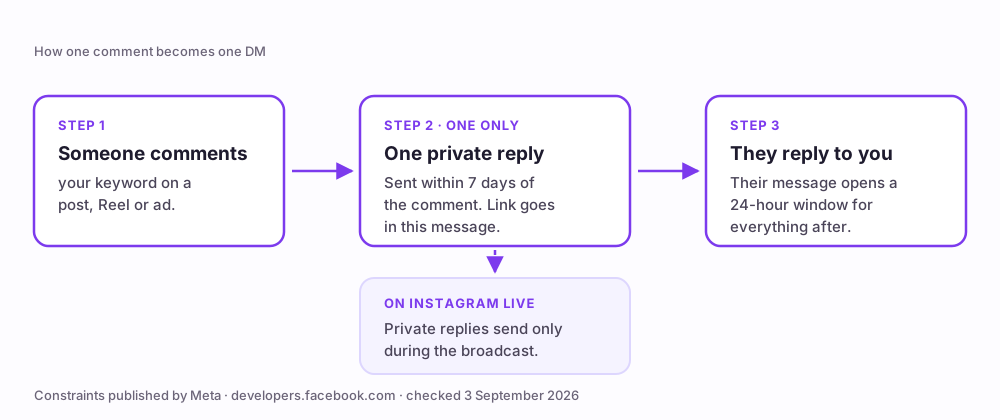
One. Meta's private-replies documentation states: "Only one message can be sent to the person who commented."
This is the rule that quietly breaks most comment-to-DM funnels. If your flow sends a greeting, then the link, then a follow-up nudge, only the first message exists as far as the private-reply API is concerned. Everything you need the person to receive has to be in message one — the link included. Follow-ups become possible only after they reply to you, which is what opens the messaging window described below.
Source: Meta, Private Replies. Verified live 3 September 2026.
How long do you have to send a private reply?
Seven days from the comment, on a post, an ads post or a Reel. Meta's wording: "The message must be sent within 7 days from when the comment was created for comments on a post, ads post, or reel."
Instagram Live is the exception, and it is a hard one: "Private replies on Instagram Live Story comments can only be sent during the live broadcast. As soon as the live broadcast has ended, private replies can no longer be sent." If you run keyword automations on Live, the automation has to be switched on before you go live, not after.
Source: Meta, Private Replies. Verified live 3 September 2026.
How long is the Instagram messaging window?
24 hours, and it opens when they message you — not when you send. Meta's Instagram messaging API documentation states: "Your app has 24 hours to respond to any message sent from an Instagram user to your app user."
Two consequences. "I'll follow up tomorrow" is usually already outside the window unless they wrote back — and the window is why a well-built flow tries to earn a reply, since a question that invites an answer restarts the clock in a way a link drop does not.
Source: Meta, Instagram Messaging API. Verified live 3 September 2026.
What rate limits does Meta publish for Instagram messaging?
Meta's Instagram Platform overview publishes per-account API rate limits, and they are more specific than the round numbers you will see quoted around the web:
| API | Published limit, per Instagram professional account |
|---|---|
| Private Replies — comments on posts and Reels | 750 calls per hour |
| Private Replies — Instagram Live comments | 100 calls per second |
| Send API — text, links, reactions, stickers | 100 calls per second |
| Send API — audio or video | 10 calls per second |
| Conversations API | 2 calls per second |
Source: Meta, Instagram Platform overview. Verified live 3 September 2026.
These are API ceilings, not sending targets. Instagram separately restricts accounts that send in ways it reads as spam, and it publishes a help article on that too — "Why there are limits for sending messages on Instagram". A tool that paces well below the ceiling is not being timid; it is staying clear of the behavioural triggers that sit underneath it. The pacing BuzzWire enforces is documented on our compliance page.
Can Instagram ban you for DMs?
It can restrict your ability to send them, and in serious cases it can disable the account. Nobody — no tool, no vendor, no article — can promise you otherwise, because enforcement is Meta's decision and Meta's terms reserve it.
What you can do is remove the behaviours that trigger it. In practice that is a short list: don't message people who haven't contacted you, don't send the same string to everyone, don't hit the same person with the same automation over and over, don't stack multiple automation tools on one account, and honour every opt-out immediately.
Be sceptical of any tool that answers this question with a guarantee. The honest answer is a mechanism you can inspect, not a promise.
What "we suspect automated behavior on your account" means
This is the message creators see most often, and it is usually not a ban — it is a temporary action limit. It generally means Instagram's systems matched your recent activity against a spam pattern: a burst of near-identical messages, a sudden change in send volume, or activity consistent with an unofficial client.
The first thing to check is how many automation tools are connected to the account. Two tools answering the same comment doubles your send rate without you having changed a single setting, and it is the easiest version of this to cause by accident — you tried something new and never disconnected the old one.
If you see the notice: stop the automation immediately rather than retrying, because repeated attempts against a restriction extend it. Check whether your messages vary. Then leave it alone. Accounts that go quiet recover; accounts that keep hammering the endpoint escalate.
Why cold DMs and mass DM on Instagram are a different category
There is a persistent idea that mass DM on Instagram is a grey area. It isn't. Cold DMs to people who never interacted with you cannot be sent through the private-reply path at all — that path only exists in response to a comment — so any tool offering them is reaching Instagram some other way. That is the actual risk, not the volume.
The same goes for tools sold on send volume. When a rules page names "unlimited DM" tools as the top cause of account loss, it is describing a category that has to route around the API to make the promise work.
BuzzWire is opt-in by architecture: there is no cold-DM feature to switch on, because the trigger is always something the other person did. That is why the comment-to-DM feature and the auto-reply and autoresponder tools behave the way they do.
What "Meta-approved" actually means, and why nobody is
You will see automation tools describe themselves as "Meta-approved" or "partnered with Meta." Meta does not issue product approvals for messaging tools, so the phrase describes nothing checkable.
The real designation is Verified Meta Tech Provider — a business and API-access verification that a company either holds or does not. BuzzWire is a Verified Meta Tech Provider. That is a verification of the business, not an endorsement of the product, and BuzzWire is not endorsed by or affiliated with Meta or Instagram.
The check to run on any tool: does it connect through Meta's official login, and can you revoke it from your Instagram settings? If yes, it is on the API. If it wants your password, no badge on the page changes what it is.
What the pricing model does to your compliance
This looks like a commercial question and is really a safety one. Most Instagram DM tools meter you by active contacts or DMs per month — ManyChat's free plan includes 25 active contacts, with paid tiers from $14 to $139 a month and per-contact overages above the included amount (manychat.com/pricing, checked 3 September 2026).
The problem is what metering does at the exact moment a post takes off. You hit a cap mid-flow, and the fix under pressure is to shut automations off or move the overflow somewhere less careful — decisions made in a hurry, on the day your account is most visible.
BuzzWire's free plan has unlimited automations and no contact caps, and the safety pacing is identical on free and paid — you cannot pay to send faster. Pricing is here, and the ManyChat comparison is here.
How to stay inside Instagram's rules: the 2026 checklist
- Connect through Meta's official login. Never hand over your Instagram password.
- Send only one private reply per comment — put the link in message one.
- Send within 7 days of the comment; on Instagram Live, during the broadcast only.
- Treat the messaging window as 24 hours from their message, not your send.
- Only automate for people who commented, replied or messaged first.
- Don't repeatedly send the same automation to the same person.
- Vary your message text so no two sends are identical.
- One link per DM, and no URL shorteners.
- Honour STOP and unsubscribe instantly and permanently.
- Run one automation tool per account, not three.
- If you get an action-limit notice, pause. Don't retry.
The full feature list shows which of these BuzzWire enforces for you rather than leaving to a setting.
Start free — no card. Unlimited automations, no contact caps, and the same safety pacing as the paid plan. Start free →
FAQ
Is Instagram DM automation against Instagram's terms? No, when it runs on the official messaging API and only replies to people who contacted you first. Instagram documents automated chats and publishes the API. Automation that initiates contact, or that reaches Instagram without the API, is a different matter.
How many DMs can I send per hour? Meta publishes API rate limits per professional account — 750 calls per hour for private replies to comments on posts and Reels, among others (see the table above). Those are API ceilings, not a target, and Instagram separately restricts accounts whose sending looks like spam. BuzzWire's own pacing is on the compliance page.
Can I send a follow-up after the automated reply? Only if they reply to you. One private reply per comment is the limit; their response opens the 24-hour messaging window in which you can continue.
Will using an automation tool get my account banned? No tool can guarantee against account action by Meta, and any that says otherwise is telling you something it cannot know. What reduces risk is mechanism: official API access, opt-in-only triggers, message variation, not repeating the same automation to the same person, and immediate opt-out handling.
Is ManyChat safe? ManyChat runs on the official API, so the safety question there is not the API — it is the contact metering, which can force awkward decisions during a traffic spike. The comparison is on our ManyChat alternative page.
What do I do if Instagram says it suspects automated behaviour? Pause every automation, check that only one tool is connected to the account, and wait. Retrying against an active restriction tends to extend it.
Do these rules apply to story replies too? Yes. A story reply is a user-initiated message, so it opens the 24-hour messaging window in the normal way. It is not a private reply, so the one-per-comment and 7-day rules don't apply to it.
Images are AI-generated illustrations.