Instagram welcome message examples, and which ones Instagram will actually send
Instagram has no welcome DM for new followers. Here is what Meta's documentation allows, with welcome message examples that fit inside the rules.
On this page
- Instagram has no welcome message for new followers
- What Instagram gives you instead: four questions and an automated response
- The first message lands in requests, and you have to accept it
- The 24-hour window decides whether your welcome message sends
- Instagram welcome message examples you can send today
- Quick reply Instagram examples: the manual kind
- Instagram's AI auto replies are a third thing again
- How to set up an Instagram welcome message that sends
- What a welcome message cannot do
- Where BuzzWire fits
- FAQ
- Does Instagram send a welcome message automatically?
- Can you auto-DM new followers on Instagram?
- What is an Instagram DM welcome message?
- How many frequently asked questions can I add on Instagram?
- Why did my welcome message never arrive?
- Do welcome messages work on a personal account?
- Are AI auto replies the same as a welcome message?
- How long do I have to reply to a comment with a DM?
In short:
- Instagram does not send a welcome DM when someone new follows you, and there is no setting that makes it.
- Meta's help centre documents three native tools instead: saved replies, up to four frequently asked questions, and AI auto replies.
- A message sent by tapping one of those four questions goes to your requests folder, and you have to accept it before you can reply.
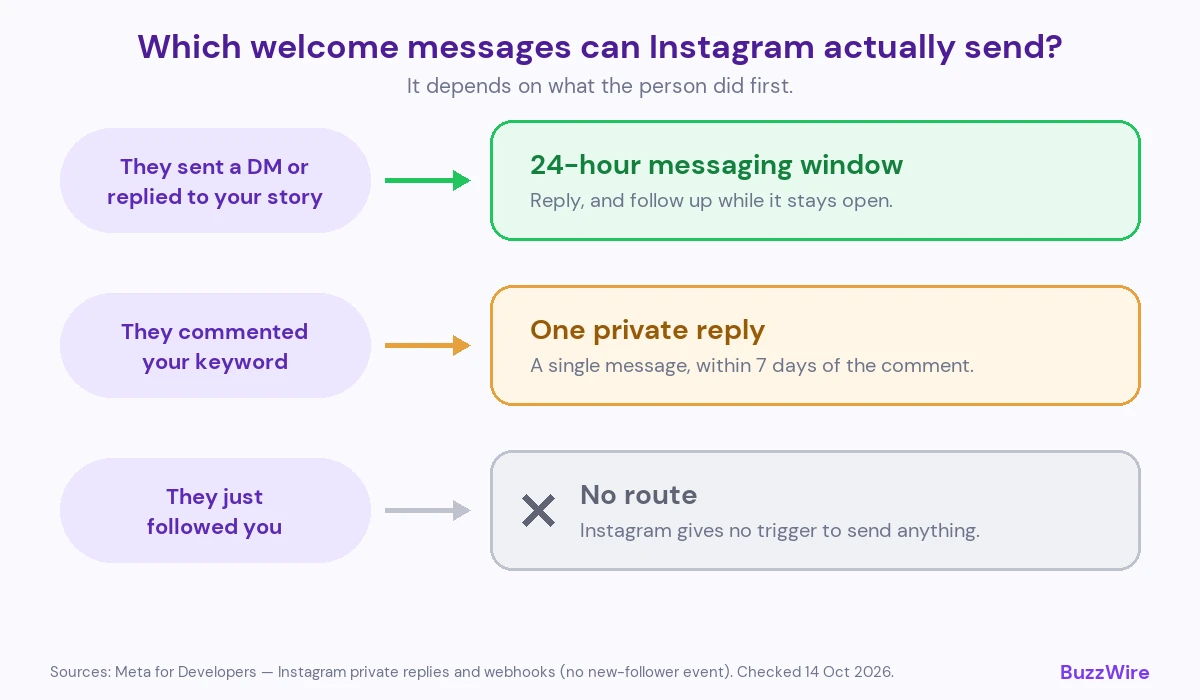
- An automated welcome DM is only sendable when the person opens the door first, by messaging you or by commenting.
- A comment earns you exactly one reply message, and you have seven days to send it.
- The examples below are grouped by what opened the conversation, because that decides what you may send.
Most Instagram welcome message examples you will find are written for a message Instagram will not let you send. The gap is not the wording. It is permission.
This page runs in the other order. It starts with what Meta's own documentation allows, then gives examples that fit inside those rules. For the wider picture, start with our guide to Instagram DM automation.
Instagram has no welcome message for new followers
There is no welcome-DM setting on Instagram. A new follow does not trigger a message.
Tools that claim to DM every new follower are describing an action the messaging API does not offer. The platform gives you no event for "someone followed me", and no open conversation to send into.
(Source: Meta for Developers, Instagram Platform webhooks. The supported webhook fields include comments, mentions and messages, and none for new followers. Checked 14 October 2026.)
An Instagram DM welcome message, properly defined, is the first automated message someone gets after they contact you. They comment a keyword. They reply to a story. They send you a DM. Any of those opens a door. A follow does not.
So the useful question is not "what should my welcome message say?". It is "what did this person do, and what does that let me send?".
What Instagram gives you instead: four questions and an automated response
Instagram's nearest native feature is frequently asked questions in chats. Meta's help centre describes it plainly:
"With chats, you can create frequently asked questions to help jump start conversations with people."
"These questions will be shown to people who try to message your business account."
The cap is published and it is small:
"You can select up to four questions to be displayed to people."
You can attach a reply to each one:
"You can also include automated responses so that people can get answers to simple questions immediately."
(Source: Meta, Frequently asked questions on Instagram chats, retrieved 14 October 2026.)
So Instagram does ship a kind of welcome flow. It is four prompts and four canned answers, on a professional account, and it starts when someone taps a question rather than when they follow you.
The first message lands in requests, and you have to accept it
Here is the part that decides whether any of this works, and it is one line in Meta's documentation:
"Note: if a person selects one of these questions, their message will go to your requests in chats. You'll need to accept their message request in order to reply to their question."
(Same source, retrieved 14 October 2026.)
Instagram's own conversation starter produces a message you cannot answer until you accept it. Your automated response fires; the thread still sits in a folder creators rarely check.
That is why a welcome message can look sent and feel missing. If you are chasing a reply that never appeared, the message requests folder is the first place to look.
The 24-hour window decides whether your welcome message sends
Two rules govern automated DMs, and both come from Meta's developer documentation.
A private reply answers a comment. One message, and a deadline:
"Only one message can be sent to the Instagram user who commented."
Private replies to comments on posts, ads and Reels can be sent within seven days of the comment. On a Live video, only during the broadcast.
A reply to a DM runs on the messaging window. It opens when the person messages you — not when you send. Follow-ups are conditional:
"Only when the Instagram user responds to the private message can you continue the conversation within the 24-hour messaging window."
(Source: Meta for Developers, Instagram private replies, checked 21 October 2026.)
One message per comment. Seven days to use it. Twenty-four hours after each reply. Those three numbers decide your copy more than any template does. The full set of platform constraints lives on our Instagram DM limits reference.
Instagram welcome message examples you can send today
These are grouped by what opened the conversation, because that is what makes them sendable. Swap the bracketed parts.
Someone DMs your keyword — you have a 24-hour window, so you can ask for something back.
- "You're in. Here's [the guide]: [link]. Tell me which part you want me to go deeper on and I'll point you at the rest."
- "Sending it now: [link]. Quick one so I send you the right follow-up — are you doing this for [use case A] or [use case B]?"
Someone comments your keyword — one message only, so everything has to be in it.
- "Thanks for commenting [KEYWORD]. [The thing] is here: [link]. No sign-up, nothing to download."
- "Here you go: [link]. That's the full [template/checklist], free. Reply if you want the walkthrough version too."
Someone replies to your story — short, conversational, one link.
- "Glad that landed. The breakdown is here: [link]."
- "Yes — [link] has the steps. Shout if you get stuck on step two, that's the one everyone asks about."
Someone messages after hours — set expectations with a real number, not "soon".
- "Thanks for messaging. I read everything in the morning, [local time]. Meanwhile [link] answers the three most common questions."
- "Got it — I'll reply by [time]. If it's about [pricing], the answer is here: [link]."
Two notes. Put the link in the first message, because the window may not open again. And vary the wording between sends.
Niche versions of all four shapes live in our template packs.
Quick reply Instagram examples: the manual kind
A saved reply is not an automation. Meta documents it as a typing shortcut:
"You can use saved replies to improve your messaging efficiency."
"To do this, hold down a message you've sent, tap more and then tap save. You'll then be able to create a keyboard shortcut for your message."
(Source: Meta, About professional features in Instagram Direct professional inbox, retrieved 14 October 2026.)
The split is simple. Use a saved reply inside a conversation you are already in. Use automation for the conversation you are not there for.
- Saved reply: "Pricing works like this — [summary]. Happy to talk through which fits."
- Saved reply: "Good question, and the honest answer depends on [variable]. Tell me about your setup."
Both can run together.
Instagram's AI auto replies are a third thing again
Meta also offers a creator AI that answers DMs. It is not a welcome message, and the difference matters.
"Turn on auto replies to allow your AI to automatically respond to messages from your selected audience on Instagram."
You choose who it answers: people you do not follow, followers you do not follow back, or only people you choose. Two constraints are published:
"This feature is being gradually introduced and may not be available to you yet."
"You must have already built a creator AI for Instagram with Meta AI Studio."
And it steps aside when you arrive:
"Your creator AI will pause auto replies while you respond, and resume auto replies after a period of time has passed."
(Source: Meta, Turn on AI auto replies for Instagram, retrieved 14 October 2026.)
An AI reply improvises an answer. A keyword automation sends the exact message you wrote, to the person who asked for it. For delivering a lead magnet, the second one is what you want.
How to set up an Instagram welcome message that sends
- Switch to a professional account. The messaging API connects to business and creator accounts only.
- Decide which door you are automating: a DM keyword, a comment keyword, or a story reply.
- Write the message so it stands alone, with the link inside it.
- Connect your account to a tool that uses Instagram's official API — BuzzWire takes a few minutes.
- Set the keyword, and add common misspellings as extra keywords for people who type it wrong.
- Add two or three wording variants so no two sends are identical.
- Test it from a second account, as a person who does not follow you.
- Check the requests folder after the test, so you know where that first message landed.
Set your four frequently asked questions in the app too. They cover people who never type a keyword.
What a welcome message cannot do
It cannot message someone who has not contacted you. That is the one every tool should say first.
It cannot promise your account is fine. Meta controls enforcement, and no tool — ours included — can guarantee against account action.
What a tool can do is send through the official API, at a pace the platform expects, and stop when Meta signals a problem. Ours is set out on our compliance page, and the Instagram DM automation rules post covers what tends to get accounts flagged.
It cannot make a cold DM acceptable. Every message described here is a reply to something the person did.
And it cannot send email. BuzzWire captures an email address and a name inside the conversation and exports them to CSV. It does not send the email itself.
Where BuzzWire fits
BuzzWire runs the three sendable shapes on this page: comment-to-DM automation, DM keyword replies and story-reply keywords. It sends through Instagram's official Graph API, never your password.
The free plan is the whole product — all three automation types + templates, message variation, no contact caps. Pro is $9.99/mo, or $79/year — about $6.58/mo, and adds in-DM lead capture with CSV export.
If you are here because a contact cap got expensive, the comparison is on our ManyChat alternative page. You can also set up automatic replies for DMs, comments and stories.
BuzzWire is a Verified Meta Tech Provider. That is a business verification by Meta, not a product endorsement, and we are not endorsed by or affiliated with Meta or Instagram.
If your messages are not arriving at all, that is a different problem: start with Instagram DMs not working.
FAQ
Does Instagram send a welcome message automatically?
No. Instagram has no welcome-DM feature for new followers, and no setting that sends one. The closest native tools are up to four frequently asked questions with automated responses, saved replies you insert yourself, and AI auto replies on accounts that have them.
Can you auto-DM new followers on Instagram?
Not through Instagram's official messaging API. There is no new-follower event to trigger on, and no open conversation to send into. A message becomes sendable once the person acts — a comment, a story reply or a DM. No tool can route around that.
What is an Instagram DM welcome message?
An Instagram DM welcome message is the first automated message someone receives after they contact you. It usually delivers a link they asked for. The trigger is a keyword in a comment, a story reply or a direct message, and the trigger decides how many messages you are allowed to send.
How many frequently asked questions can I add on Instagram?
Four. Meta's documentation states you "can select up to four questions to be displayed to people", and each one can carry an automated response. They appear to people trying to message your professional account, and a tapped question arrives in your requests folder.
Why did my welcome message never arrive?
Check three things. The person may have commented rather than messaged, which allows one reply inside seven days. Your reply window may have closed, since follow-ups need a response within 24 hours. Or the message is sitting unaccepted in your requests folder.
Do welcome messages work on a personal account?
No. Instagram's messaging API connects to professional accounts only, so both the native tools and any connected automation need a business or creator account. Switching is free and reversible in the app, and it does not change your handle, your followers or your posts.
Are AI auto replies the same as a welcome message?
No. An AI auto reply generates an answer to whatever someone asks, from an AI you build in Meta AI Studio. A welcome automation sends the exact message you wrote, triggered by a keyword. For delivering a specific link to someone who asked for it, the written message is more predictable.
How long do I have to reply to a comment with a DM?
Seven days, for comments on posts, ads and Reels, and you get one message. On a Live video the reply has to go out during the broadcast. After that the only route back is the person messaging you first, which opens a 24-hour window.