Where Instagram message requests go, and why yours are missing
Instagram message requests not showing? Here is where requests live, why a connected tool moves them to General, and how to find a DM that vanished.
On this page
- What an Instagram message request is
- How to check message requests on Instagram
- Where are message requests on Instagram?
- Instagram hidden requests, and what sits in them
- Instagram message request not showing: the three causes
- What Meta documents about message requests and third-party tools
- What happens to your inbox at high message volume
- The Connected tools setting that decides what a tool can see
- Why an automated reply is not a cold DM
- What to do when a tool's replies stop appearing
- FAQ
- Why does Instagram say I have message requests when the folder looks empty?
- Where do Instagram DM requests go after I accept them?
- How do I see hidden requests on Instagram?
- Does using an automation tool change where my messages appear?
- Can Instagram disable my general folder?
- Do automated replies land in the recipient's message requests?
- Why would a message arrive without a notification?
- Does opening a message request tell the sender I've seen it?
In short:
- Instagram message requests are DMs from people you do not follow, held apart until you accept them.
- On a professional account, Meta describes three folders: primary, general and requests.
- Meta documents that requests answered through a third-party tool are moved to the general folder, where unread notifications are off by default.
- Meta also documents that high message volume can disable the general folder, leaving threads reachable only in the tool's inbox.
- The Connected tools setting can switch a connected tool off, after which it can neither read nor send.
- DMs from an account you have restricted go to your pending inbox, not your main inbox.
Instagram message requests are the DMs Instagram holds back from your inbox. Most creators meet the folder after a post does well. If you also run Instagram DM automation, the confusion doubles.
This page explains what Instagram publishes about where those messages go. The rules below are quoted from Meta's documentation, with the link and the date each page was read.
What an Instagram message request is
An Instagram message request is a DM from someone you do not follow, held outside your main inbox until you accept it. Accepting it opens a normal conversation.
Meta's wording is plain: "Requests are direct messages from accounts that you don't follow. You can choose to accept or deny these requests, and request messages aren't marked as "seen" until you accept them."
That last clause is why a message can be delivered and unread at once. It is also why you can open a request and read it without the sender seeing a receipt.
The folder matters more on a professional account, where the valuable messages often come from people who have not followed you yet.
How to check message requests on Instagram
Open your inbox and look for the requests folder. The label moves between app versions, so go by position rather than wording.
- Tap the DM icon to open your inbox.
- Look for the requests folder alongside your conversations.
- Tap it to see every pending request.
- Open a request to read it without accepting.
- Tap accept to move it into your inbox, or delete it if it is spam.
- Return to the inbox and check the general folder too.
- Check your tool's inbox if the account is connected to one.
Step 7 is the one most guides leave out. The next sections are why it belongs there.
Where are message requests on Instagram?
Message requests sit in their own folder, not inside your main conversations. On a professional account, Meta describes three folders, each with a different job.
- Primary: "The primary folder is for messages you'd like to see first." Messages land here, and you can swipe them into general.
- General: "The general folder is for messages you'd like to get back to later." Notifications for unread messages here are off by default.
- Requests: "The requests folder is for messages you haven't accepted."
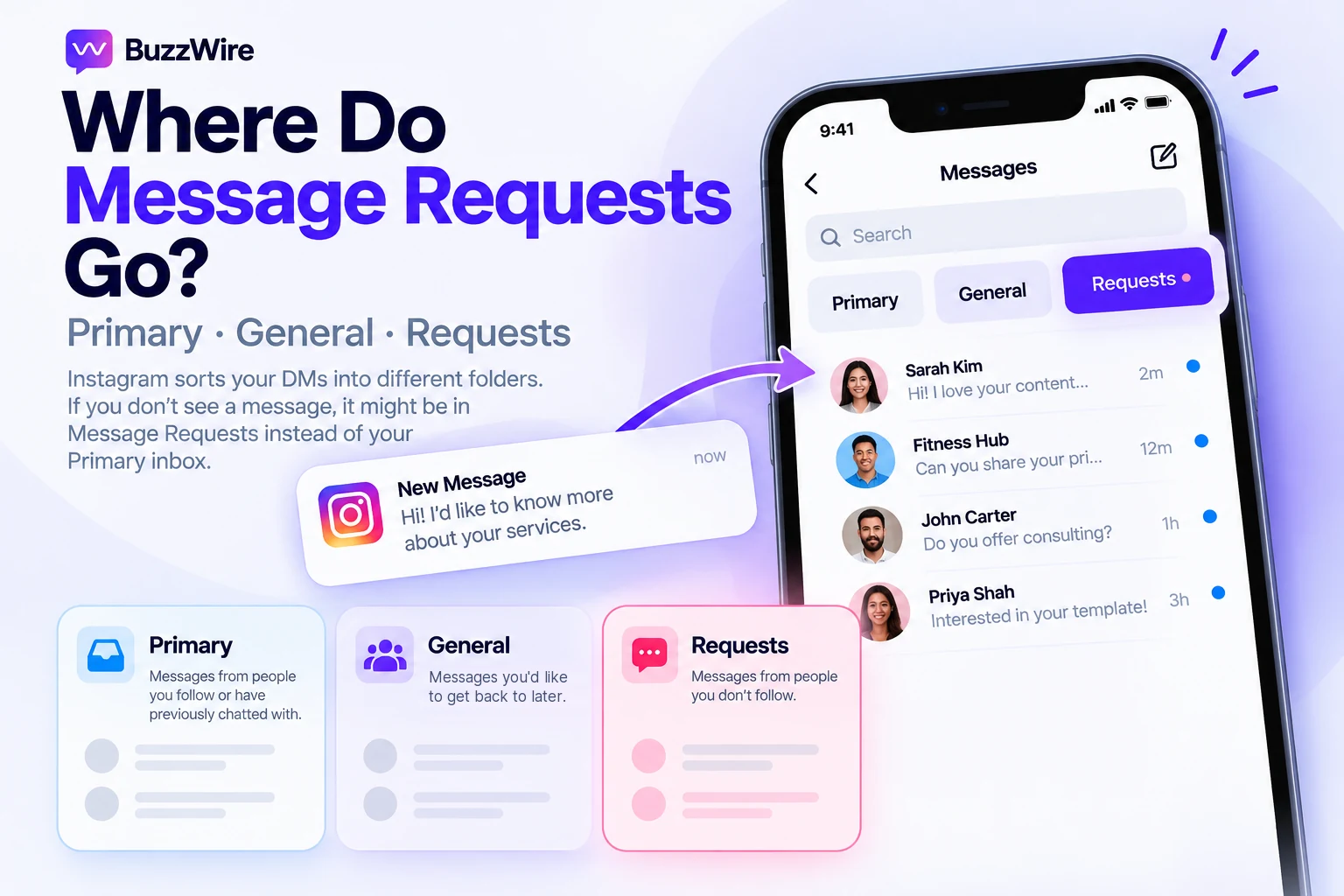
That split is what makes a message look lost. Accepting a request normally sends the conversation to primary. Meta writes: "When you reply to or accept a message request from someone, their future messages will go directly to your primary folder."
A connected tool changes that rule, which the next sections cover.
Source: Meta, About professional features in Instagram Direct professional inbox, retrieved 12 October 2026.
Instagram hidden requests, and what sits in them
Instagram hidden requests are requests the platform has filtered for you. Meta says hidden requests containing messages that "may be offensive, unwanted, contain spam or are hidden based on your hidden words preferences" are moved to the requests folder.
People search for how to see hidden requests on Instagram and get a settings tour. The short answer: open the requests folder. Meta says that is where hidden requests are kept.
Hidden requests are a separate idea from the general folder, and the two get mixed up. Hidden means filtered before you accepted it. General means accepted, then sorted away from primary.
A third holding place is documented too. Meta writes that restricting an account changes where its DMs land.
"Direct messages from people you've restricted go into your pending inbox instead of your main inbox."
If you restricted someone months ago and forgot, their messages still arrive. They arrive somewhere you do not look.
Sources: Meta, About professional features in Instagram Direct professional inbox · Meta, About protecting your business on Instagram. Both retrieved 12 October 2026.
Instagram message request not showing: the three causes
An Instagram message request not showing is usually one of three things, and Meta documents all three. The request was moved, the app stopped displaying it, or your tool's access was turned off.
Ask one question first. Is the account connected to a third-party messaging tool?
- Moved. A request answered through a connected tool goes to the general folder.
- Not displayed. Above a certain volume, the app stops showing some threads at all.
- No access. The Connected tools setting can be off, so the tool sees nothing.
If the account is connected to nothing, look instead for a hidden request or a restricted sender. If messages are failing to send rather than going missing, that is a different problem, covered in Instagram DMs not working.
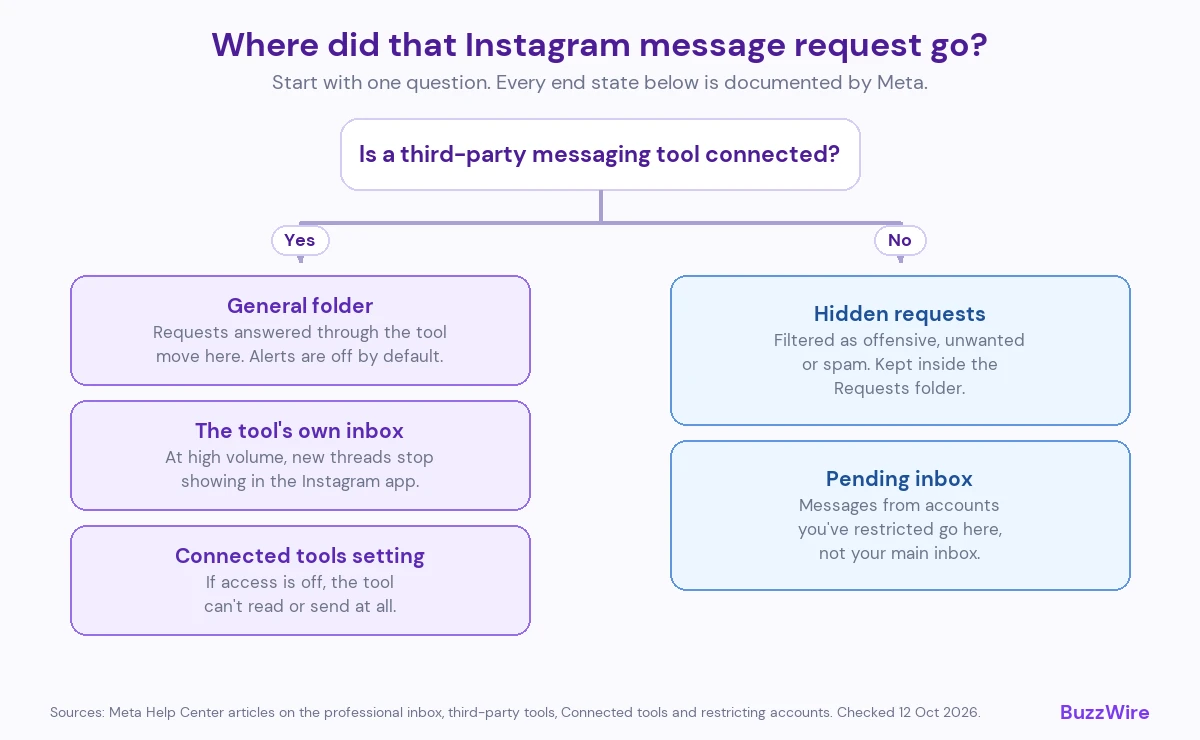
What Meta documents about message requests and third-party tools
Meta publishes a help article on exactly this. It states: "To help keep your Instagram inbox organized, all message requests that you answer using a third-party tool will be moved to the general folder."
Chats from people you follow are not affected. "New chats from people you follow will continue to appear in the primary folder."
The article is explicit that your own sorting settings do not override the move. "Even if you've changed your settings to enable messages from certain people to go directly to your primary folder, if you're answering these messages using a third-party tool, they'll go to your general folder."
The move is reversible by hand. "You'll still be able to move individual messages between the general and primary folders."
Nothing has been deleted here. The thread is in general, and the primary tab is hiding it.
Source: Meta, About using the Instagram inbox when your account is connected to third-party tools, retrieved 12 October 2026.
What happens to your inbox at high message volume
Meta documents a second behavior, and this one is a real constraint rather than a sorting quirk. "Instagram inboxes using third-party tools to automate responses may experience limited functionality."
The stated reason is capacity. "This is because the Instagram inbox cannot support the same number of messages as some third-party tools."
Two outcomes are named. The first covers new chats.
"If the large number of messages come from new chats initiated from message requests, new messages that you respond to using third-party tools will no longer appear in the Instagram inbox."
Meta's instruction is direct. "You'll need to view these messages in your third-party inbox."
The second outcome is stronger.
"If a large number of messages are sent and received in your general folder at the same time, the general folder will be disabled."
Meta adds: "New threads will no longer be created and existing threads will be inaccessible."
Read that as a design boundary, not a fault. A viral post can push an inbox past what the app itself will display.
Pacing matters on the sending side too. How BuzzWire paces its sending is set out separately, and the platform's rate limits live in our Instagram DM limits reference.
The Connected tools setting that decides what a tool can see
One setting governs whether any connected app can read or send your Instagram messages. Meta describes both states in the same article.
"If you allow access to Instagram messages, you can view or send Instagram messages on Facebook Pages, Meta Business Suite, Business Manager and other third-party apps you use to manage your account."
And the other way: "If you don't allow access, you can only view and send Instagram messages from Instagram."
Meta's documented path to it, on mobile:
- Go to your profile and tap the menu in the top right.
- Select Messages and story replies.
- Select Message requests.
- Below Connected tools, toggle access on or off.
Meta's article also lists a second path, starting from your profile picture, whose fourth step is Message controls instead.
If this toggle is off, no tool is broken. It has been told not to look.
Source: Meta, Manage access to Instagram messages across apps, retrieved 12 October 2026.
Why an automated reply is not a cold DM
An automated reply to a comment is a private reply. A private reply is a specific API action with its own rules, and it is one message sent because someone commented.
Meta's developer documentation sets the limits. "Only one message can be sent to the commenter", and "Follow-up messages can only be sent if the recipient responds, and must be sent within 24 hours of the response."
That is the difference between a private reply and a stranger's cold DM. The comment is the invitation, and the other person's reply opens the conversation.
Instagram's own business features behave the same way. Meta writes that a person choosing one of your frequently asked questions creates a request.
"If a person selects one of these questions, their message will go to your requests in chats." And then: "You'll need to accept their message request in order to reply to their question."
A message in requests is not a sign of a sending error. Instagram routes legitimate business messages there by design.
Sources: Meta for Developers, Private Replies · Meta, Frequently asked questions on Instagram chats. Both checked 12 October 2026.
What to do when a tool's replies stop appearing
Work from the documentation, not the folklore. Reinstalling the app does not change which folder a thread is in.
- Open the general folder before concluding anything is missing.
- Check the Connected tools toggle, and turn it back on if it is off.
- Open your tool's own inbox, which Meta names as the place to look at volume.
- Check whether you restricted the sender at some point.
- Reconnect the account if the tool reports a permissions error.
What DM automation actually does covers the mechanism end to end. Turning DMs into leads covers what to send once a conversation is open.
BuzzWire runs comment-to-DM automation, an Instagram autoresponder, keyword replies in DMs and story-reply automation on Instagram's official Graph API. The free plan is the full product, with no contact caps. See the full feature list, plans and pricing, or the ManyChat alternative page.
FAQ
Why does Instagram say I have message requests when the folder looks empty?
Check the hidden requests first. Meta says messages filtered as offensive, unwanted or spam, or caught by your hidden words settings, are kept in the requests folder. If your account is connected to a third-party tool, Meta also says requests answered through that tool are moved to the general folder.
Where do Instagram DM requests go after I accept them?
Meta says that when you reply to or accept a message request, that person's future messages go directly to your primary folder. The exception is a connected tool. Meta says requests answered through a third-party tool are moved to the general folder instead, even if your settings would send them to primary.
How do I see hidden requests on Instagram?
Open your inbox and go to the requests folder. Meta says hidden requests, meaning messages that may be offensive, unwanted or spam, or that match your hidden words settings, are kept there. They are separate from the general folder, which holds accepted conversations sorted away from primary.
Does using an automation tool change where my messages appear?
Yes, and Meta documents it. Message requests answered through a third-party tool are moved to the general folder, even if your settings would otherwise send them to primary. At high volume, Meta says some threads will no longer appear in the Instagram inbox at all and must be read in the tool's inbox.
Can Instagram disable my general folder?
Meta's help article says it can. A large number of messages sent and received in the general folder at the same time will disable that folder. New threads are then not created, and existing threads become inaccessible. Meta directs you to your third-party inbox to reach those conversations instead.
Do automated replies land in the recipient's message requests?
Meta does not publish an answer to this, so we are not going to assert one. What is documented is the sending rule: only one message can be sent to a commenter, and a follow-up is allowed only after they respond. Treat delivery placement as unverified until Meta documents it.
Why would a message arrive without a notification?
On a professional account, Meta says notifications for unread messages are turned off for the general folder by default, so anything sorted there arrives silently unless you change that setting. Restricted accounts are routed differently again. Meta states that messages from people you have restricted go into your pending inbox.
Does opening a message request tell the sender I've seen it?
No. Meta says request messages aren't marked as "seen" until you accept them, so you can read a request without the sender getting a seen receipt. Meta does not describe any alert for deleting a request either. That is why a sender may message twice: they cannot tell whether the first was read.