What does Limit interactions mean on Instagram?
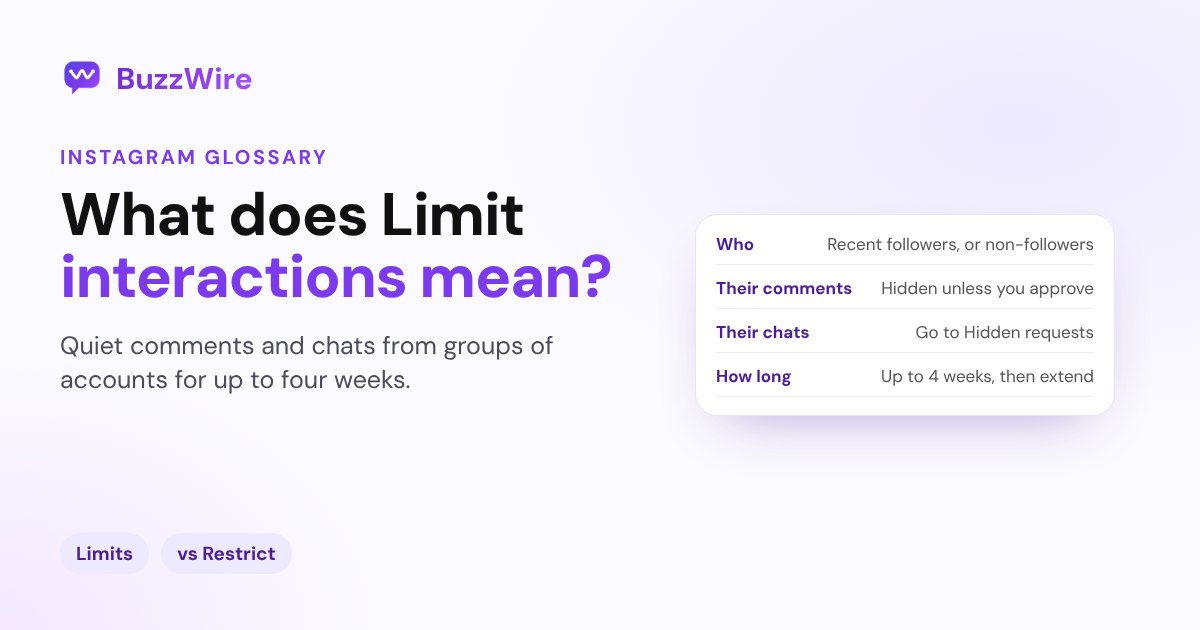
Limit interactions on Instagram hides new comments and chats from groups of accounts for up to four weeks, without telling them. Who it limits and how.
On this page
- What does Limit interactions mean on Instagram?
- Who can you limit?
- What happens to limited accounts?
- How to limit interactions on Instagram
- Limit interactions vs Restrict vs Block
- A tip for creators
- FAQ
- What does Limit interactions mean on Instagram?
- Do people know if you limit them on Instagram?
- How long does Limit interactions last?
- Can limited accounts still message me?
- What's the difference between Limit and Restrict on Instagram?
In short:
- Limit interactions lets you temporarily hide new comments and chats from groups of accounts, "without them knowing".
- You choose who: recent followers, accounts that don't follow you, or everyone but your Close Friends.
- Limited accounts' comments are hidden unless you approve them, and their new chats go to Hidden requests.
- You can limit interactions "for up to four weeks at a time" and extend it as long as you like.
- It works on groups of people. To handle one account, use Restrict or Block.
Everything below comes from Instagram's Help Center page, "Temporarily limit people from interacting with you on Instagram", checked 27 Oct 2026.
What does Limit interactions mean on Instagram?
It's a temporary shield for your comments and DMs. Instagram's Help Center describes it this way: "If you feel like you're being bullied or harassed, you can temporarily limit interactions from certain groups of people on Instagram without them knowing."
Instagram first launched it as Limits in August 2021, so you'll see both names. (Instagram, Aug 2021)
Who can you limit?
You pick one or more groups:
- Recent followers: accounts "that have started following you in the last week".
- Accounts that don't follow you.
- Everyone but close friends: accounts not on your Close Friends list. Instagram calls this "the most restrictive setting", so choosing it turns off the other two options.
If you limit recent followers, Instagram says "anyone who follows you during the time period you've selected will automatically be limited."
What happens to limited accounts?
From Instagram's Help Center:
- Comments: they "can still comment on your posts and reels but their comments will be hidden unless you approve them."
- Chats: "Any new chat threads these accounts create with you will be moved to the 'Hidden requests' folder in 'Message requests'."
- Stories: "Limited accounts will not see an option to reply to your stories."
- Tags, mentions and remixes: they "will see a general message that you don't let everyone do this."
- Old chats: "Only new chat threads with the accounts you limit will be hidden." Existing conversations stay where they are.
Comments that were hidden while the tool was on stay hidden after you turn it off.
How to limit interactions on Instagram
These steps are from Instagram's iPhone help page:
- Go to your profile and tap Menu in the top right.
- Below How others can interact with you, tap Limit interactions.
- Tap What will be limited, then choose Some interactions or Most interactions.
- Tap Who will be limited and choose your groups.
- Tap When we'll remind you to turn this off and pick a reminder.
- Tap Turn on.
To switch it off, go back to Limit interactions and tap Turn off.
Limit interactions vs Restrict vs Block
| Limit interactions | Restrict | Block | |
|---|---|---|---|
| Works on | Groups of accounts | One account | One account |
| They're told | No | No | No |
| Their comments | Hidden unless you approve | Hidden from others | Can't comment |
| Their new DMs | Hidden requests | Message requests | Can't message |
| How long | Up to 4 weeks, extendable | Until you undo it | Until you unblock |
For one person, see what Restrict means on Instagram.
A tip for creators
If a post goes viral, Limits can quiet comments from strangers. Keep in mind that hidden comments still exist, and limited accounts' new chats land in Hidden requests. If you run comment-to-DM on that post, check your settings so real fans still get their link. Our guide to Instagram message requests explains where hidden chats go.
FAQ
What does Limit interactions mean on Instagram?
It's an Instagram setting that temporarily hides new comments and chats from groups of accounts you choose: recent followers, accounts that don't follow you, or everyone except your Close Friends. Instagram says it works without the limited accounts knowing, for up to four weeks at a time.
Do people know if you limit them on Instagram?
No. Instagram's Help Center says you can limit interactions "without them knowing". If a limited account tries to tag or mention you, they only see a general message that you don't let everyone do this, not a note that they're limited.
How long does Limit interactions last?
You can limit interactions for up to four weeks at a time, and extend it for as long as you like, according to Instagram. You also choose when Instagram should remind you to turn it off, and you can turn it off yourself at any time.
Can limited accounts still message me?
They can, but their new chats are moved to the Hidden requests folder in Message requests, so you don't see them in your main inbox. Chats that already existed before you turned on Limits aren't hidden.
What's the difference between Limit and Restrict on Instagram?
Limit interactions works on groups of accounts at once and is temporary, up to four weeks at a time. Restrict works on one account and stays until you undo it. Both hide comments and move messages out of your main inbox without telling the other person.
Grow without the chaos. Start free on BuzzWire and let keyword DMs send your links.