What does Active now mean on Instagram?
Active now on Instagram means someone is using the app right now, shown by a green dot in messages. Who can see it and how to turn it off.
On this page
- What does "Active now" mean on Instagram?
- Who can see when you're active on Instagram?
- How accurate is "Active now"?
- How to turn off Activity Status on Instagram
- Activity Status for creators and businesses
- FAQ
- What does the green dot on Instagram mean?
- Does "Active now" mean they're on my chat?
- Can someone see I'm active if I don't follow them?
- Why can't I see when someone was last active?
In short:
- "Active now" means the person is using Instagram at the moment. It's part of Instagram's Activity Status.
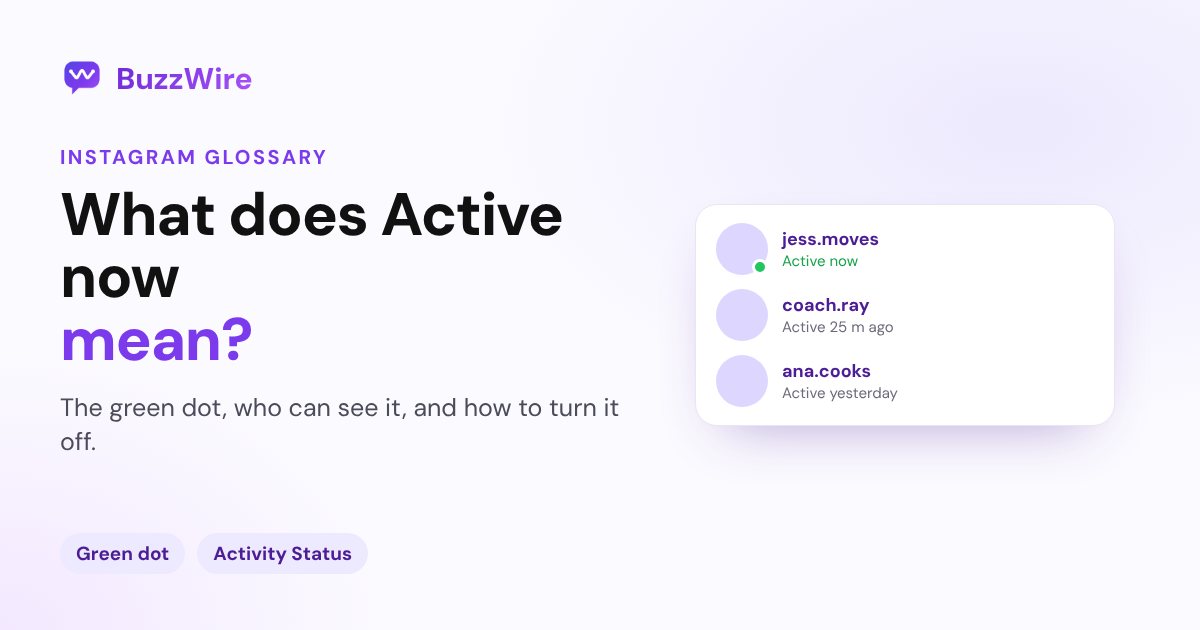
- It shows as a green dot next to their profile picture in messages, or a time such as "Active 25 m ago".
- It only appears when both of you have Activity Status turned on.
- Turn yours off and nobody sees when you're active, but you can't see anyone else's either.
- If someone has restricted you, you can't see their status.
Everything below comes from Instagram's Activity Status help page and its page on seeing who's active, checked 22 Oct 2026.
What does "Active now" mean on Instagram?
It means the person currently has Instagram open. Instagram's help page says that with Activity Status on, "people you follow and anyone you message will see when you were last active or currently active on Instagram".
You'll see it in your messages as:
- A green dot next to their profile picture: active now.
- A time, such as "Active 25 m ago" or "Active yesterday": when they were last active.
- Activity in a chat, such as "Typing" or "Seen", when you open the conversation.
Who can see when you're active on Instagram?
People you follow and anyone you message, as long as you both have Activity Status on. Instagram's page on seeing who's active says status shows "when you both have activity status turned on".
Restricted accounts are the exception: someone you've restricted can't see when you're online. See what Restrict means on Instagram.
How accurate is "Active now"?
Instagram doesn't publish exactly how it measures activity, so treat it as a rough signal. "Active now" doesn't mean they've seen your message; a Seen marker in the chat does.
How to turn off Activity Status on Instagram
From Instagram's help page (menu names as of 22 Oct 2026):
- Go to your profile and tap Menu in the top right.
- Under "How others can interact with you", tap Messages and story replies.
- Tap Show Activity Status.
- Turn off the switch.
On a computer: click More, then Settings, then Messages and story replies, then Show Activity Status.
Instagram is clear about the trade-off: when it's off, "you also won't be able to see anyone else's Activity Status".
Activity Status for creators and businesses
If people message your business account, they may see when you're active, and expect a quick reply. Two ways to handle that:
- Turn Activity Status off if you'd rather reply on your own schedule.
- Automate the replies that don't need you, such as links, prices and FAQs, so people get an answer even when you're offline. Meta gives you a 24-hour window to reply to a message; see the Instagram DM limits.
BuzzWire replies to keyword DMs, comments and story replies automatically, with the message you wrote. The free plan has unlimited DMs on one account. Start free
FAQ
What does the green dot on Instagram mean?
It means the person is active on Instagram right now. It appears next to their profile picture in your messages, and only when both of you have Activity Status turned on.
Does "Active now" mean they're on my chat?
No. It means they're using Instagram. When you open your conversation, Instagram may show more, such as "Typing" or "Seen", which tells you they're in the chat or have read your message.
Can someone see I'm active if I don't follow them?
If you've messaged each other, they may. Instagram says people you follow and anyone you message can see your status when you both have it on. Turn off Activity Status to hide it from everyone.
Why can't I see when someone was last active?
Either you or they have Activity Status turned off, or they've restricted you. Activity Status only works when both people have it on.