24 Instagram DM Templates for Realtors and Real Estate Agents
A listing Reel does 40,000 views and 200 people comment “INFO.” An agent working showings and closings answers maybe 40 by Thursday. The other 160 aren’t lost to bad marketing — they’re lost to a reply that arrived after they stopped caring.
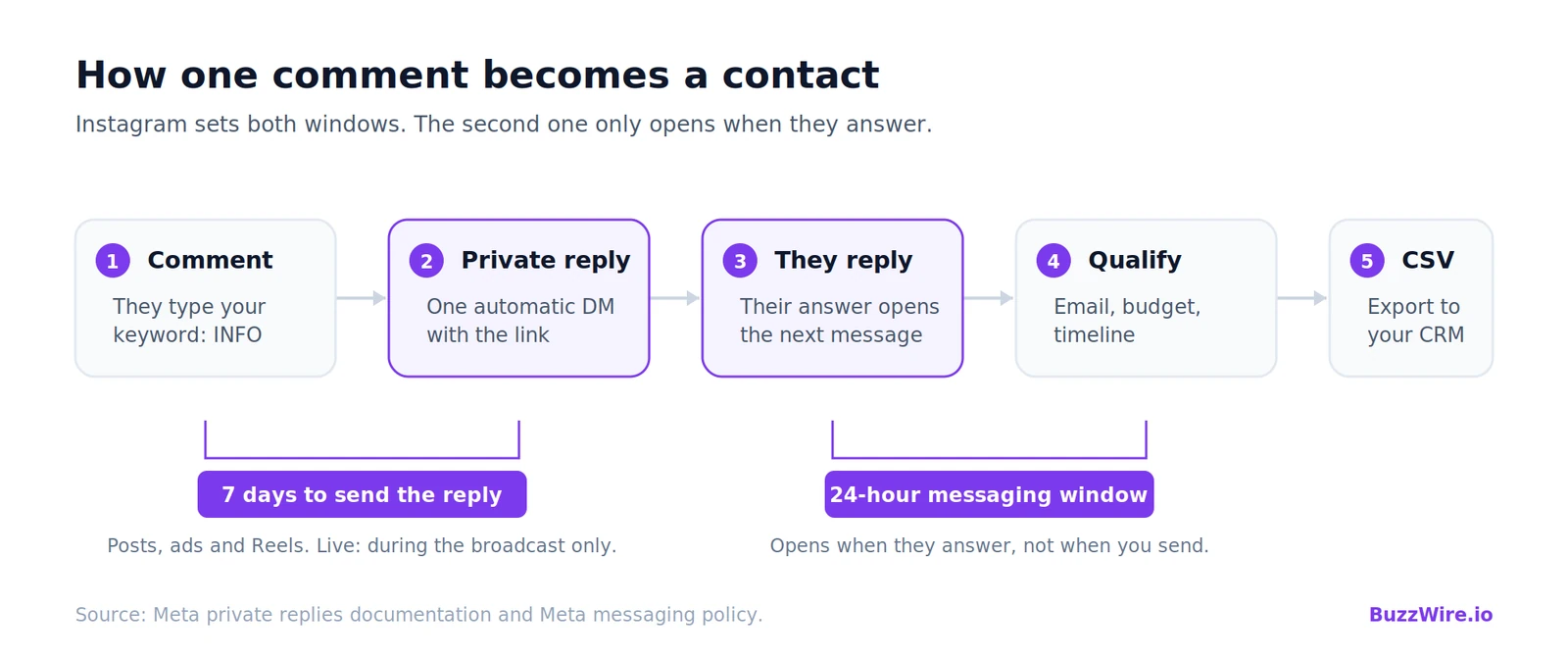
What a comment-to-DM flow is, in two sentences. Someone comments your keyword on a post or Reel, and your tool sends them one automatic DM with what they asked for; their reply then opens a window where you can qualify them or capture an email. Instagram allows one automated reply per comment, gives you seven days to send it, and opens a 24-hour messaging window when they answer — the three rules every script below is written around, documented in full in the private reply rules.
Below are 24 ready-to-paste flows for real estate accounts, each a complete unit — post idea → trigger keyword → exact DM with spintax → qualifying or capture line. For the mechanism rather than the scripts, start with how comment-to-DM automation works. Everything here runs on BuzzWire free and works in any tool with a comment-to-DM trigger.
One thing first: real estate is the only niche in this library where the message itself is regulated. A DM sent two hundred times is advertising, and carries the same disclosure and fair housing obligations as a postcard. For the product side on a working agent account, see the realtor walkthrough.
How one comment becomes a contact
Instagram sets two windows, and the second one only opens when they answer. That’s why every DM below leads with the thing they asked for and ends with a small ask — their reply is what earns you the message where qualifying and email capture happen.
Buyer leads: 6 templates

#1 · INFO — The listing walkthrough
A 45-second Reel of a new listing.
INFO
{Hi|Hey} {{first_name}}! Full details, price and floor plan → [link]. {Reply|Send} TOUR to see it this week.“Want the three closest comparables? Drop your email 👇”
#2 · START — The first-time buyer guide
Carousel: "What $X actually buys in [area]."
START
{Sending it now|Straight over} {{first_name}} — the buyer guide → [link]. Step 3 is the one most people do out of order.“Reply with your target move month and I'll send the timeline backwards from it.”
#3 · LOAN — The pre-approval explainer
Reel: "Pre-qualified and pre-approved are not the same thing."
LOAN
{Hey|Hi} {{first_name}}, the breakdown → [link]. I don't lend, but I can introduce you to two people who do.“Want the intro? Reply LENDER.”
#4 · COSTS — The closing-cost worksheet
Carousel: "The costs nobody mentions until week six."
COSTS
{Grabbed it for you|Here it is} {{first_name}} — every line item → [link]. Estimates, not a quote.“Want it filled in for a price point? Reply with the number.”
#5 · ALERT — The saved-search setup
Reel: "How to see listings before they hit the apps."
ALERT
{Hi|Hey} {{first_name}}! Set your alert → [link]. Two minutes, and you'll get matches the morning they list.“Tell me beds, baths and budget and I'll build it for you.”
#6 · OFFER — The offer-strategy breakdown
Carousel: "Why the highest offer didn't win."
OFFER
{On its way|Just sent} {{first_name}} — the offer breakdown → [link]. Terms beat price more often than people expect.“Working on an offer this week? Reply and I'll look at the terms.”
Sellers and listings: 6 templates
#7 · VALUE — The home-value request
Reel: "What your home is actually worth in this market."
VALUE
{Hi|Hey} {{first_name}}! Valuation request form → [link]. I'll send back a real range with the comps I used, not an automated guess.“Reply with your street name and I'll start pulling comps.”
#8 · PREP — The pre-listing checklist
Carousel: "The 30-day pre-listing checklist."
PREP
{Attaching it now|Here you go} {{first_name}} — the 30-day pre-listing checklist → [link]. Week one is the cheapest week to fix things.“Want the version for a specific move-out date? Email 👇”
#9 · SOLD — The what-sold-nearby recap
Reel walking through this month's nearby sales.
SOLD
{Hey|Hi} {{first_name}}, this month's sold list for [area] → [link]. Last column is days on market, which is the one worth reading.“Want this every month? Drop your email 👇”
#10 · STAGE — The staging-on-a-budget guide
A before/after Reel of a staged room.
STAGE
{Got you|Sending now} {{first_name}} — staging under $500, room by room → [link].“Send me a photo of the room and I'll tell you what I'd move.”
#11 · NET — The seller net sheet
Reel: "What you actually walk away with at closing."
NET
{Hi|Hey} {{first_name}}! The net-proceeds worksheet → [link]. Fill in your mortgage balance and it does the rest.“Want it run with real local numbers? Reply here.”
#12 · RESET — The expired-listing reset
Reel: "Why your listing expired — and the fix."
RESET
{Straight over|Here it is} {{first_name}} — the relist checklist → [link]. Price is usually the third problem, not the first.“Reply with what it was listed at and I'll tell you what I'd change.”
Open houses, showings and events: 6 templates

#13 · OPEN — The open house RSVP
Reel teasing Saturday's open house.
OPEN
{Hi|Hey} {{first_name}}! Saturday 11–1, address and parking notes → [link]. {Reply|Send} YES and I'll hold you a packet.“Want open-house dates on my list? Drop your email 👇”
#14 · TOUR — The private showing request
Reel: "Book a private showing this week."
TOUR
{Just sent it|Got you} {{first_name}} — my showing calendar → [link]. Evenings and Sunday afternoons are open this week.“Reply with two times that work and I'll confirm one.”
#15 · AREA — The neighbourhood tour route
Reel touring the neighbourhood.
AREA
{Hey|Hi} {{first_name}}! Self-guided route, six stops → [link]. Do it on a Saturday morning.“Want a different part of town? Reply with the area.”
#16 · PHASE — The new-development preview
Reel walking the new development site.
PHASE
{On its way|Sending now} {{first_name}} — floor plans and the release schedule → [link]. Phase 2 pricing is on page 4.“Want an alert when Phase 3 releases? Email 👇”
#17 · WALK — The virtual tour link
A Reel clip of the 3D virtual tour.
WALK
{Hi|Hey} {{first_name}}, the full 3D walkthrough → [link]. Works on your phone, no app needed.“Reply if you'd like the floor plan with dimensions.”
#18 · INVITE — The client event invite
Reel inviting followers to your client event.
INVITE
{Thanks {{first_name}}|Got it {{first_name}}} — RSVP here → [link]. Bring whoever you like, it's not a sales pitch.“Reply with a headcount and I'll add you to the list.”
Investors, relocation and referrals: 6 templates
#19 · YIELD — The rental-yield calculator
Reel: "Does this rental actually cash-flow?"
YIELD
{Hi|Hey} {{first_name}}! Rent-vs-carry calculator → [link]. Assumptions are listed so you can change them.“Reply with a purchase price and I'll run it.”
#20 · MOVE — The relocation packet
Carousel: "Relocating to [city] — what to know."
MOVE
{Straight over|Here it is} {{first_name}} — utilities, commute times and the school district lookup → [link].“Which city are you coming from?”
#21 · RENT — The first-rental checklist
Reel: "Your first rental, step by step."
RENT
{Hey|Hi} {{first_name}}, the landlord starter checklist → [link]. The screening section saves the most money.“Want the lease-clause list too? Email 👇”
#22 · SWAP — The 1031 basics
Reel explaining a 1031 exchange in plain English.
SWAP
{Sending it now|Got you} {{first_name}} — plain-English overview → [link]. General information, not tax advice; your CPA runs the clock.“Reply for an intro to a qualified intermediary.”
#23 · CITY — The agent referral
Reel: "Moving out of state? I'll connect you."
CITY
{On its way|Here you go} {{first_name}} — tell me where you're headed and I'll connect you with someone I'd use myself → [link].“Reply with the city and a rough timeline.”
#24 · ANNIVERSARY — The past-client check-in
Reel celebrating a past client's one-year mark.
ANNIVERSARY
{Happy anniversary {{first_name}}|One year in, {{first_name}}} 🎉 This year's value update for your street → [link].“Want the full report? Reply and I'll send it.”
The disclosure line: what fair housing and the REALTOR® Code require before a DM scales
An automated DM is advertising. It goes out hundreds of times, in writing, with a timestamp.
Your firm’s name has to be in it. Standard of Practice 12-5 of the REALTOR® Code of Ethics states that REALTORS® shall not advertise real estate services or listed property in any medium — electronic media named explicitly — without disclosing the REALTOR®’s firm name in a reasonable and readily apparent manner, either in the advertisement or via a link to a display carrying the required disclosures. Article 12 sets the standard above it: be honest and truthful, present a true picture. Many state licence laws want a licence number as well.
The Fair Housing Act reaches your DM copy. 42 U.S.C. §3604(c) makes it unlawful to make, print or publish any notice, statement or advertisement about the sale or rental of a dwelling indicating a preference, limitation or discrimination based on a protected characteristic. HUD lists those characteristics as race, colour, national origin, religion, sex, familial status and disability. HUD’s April 2024 guidance on advertising through digital platforms — now on HUD’s archive site — adds that any entity playing a substantial role in a discriminatory housing outcome can be liable, even one that is not the housing provider. Article 10 covers the same ground for professional services.
Three habits follow:
- Describe the property, never the neighbours. Square footage, named schools with distances, tax figures: fine. Phrases describing who belongs in a home rather than what is in it — training examples include “family-friendly,” “safe area,” “walkable to church,” “exclusive” — stay out of copy you send at volume. Those examples come from REALTOR® and brokerage fair housing training, not a current HUD statutory word list; HUD withdrew its old advertising word-list rule and there is no official list today. Have your broker or counsel review your final set.
- Never let an automation answer a demographic question. “What kind of people live there?” gets a personal reply from you, never an automated one. There is no safe automated answer.
- Keep numbers verifiable. Value estimates, rent projections and closing figures should be labelled as estimates with assumptions attached — Article 12’s true-picture standard applied to a message you send at volume.
Three rules specific to real estate flows
- Put the brokerage line in the template, not in your memory.
— {{agent_name}}, [Brokerage], Lic #00000belongs in every script, so it survives the post that goes viral. - One keyword per post. Two keywords in one caption split attention and reduce both. Run two posts instead.
- Add common misspellings as extra keywords. “INF0”, “infoo” and “TUOR” appear on every listing post, and those near-misses are often the most motivated people in the thread.
The platform-level rules — one reply per comment, the seven-day window, spintax, one link, no shorteners — are in Meta’s three rules on comment replies. For timing your posts, see the posting-time data by day.
Why BuzzWire for real estate
A listing Reel doesn’t behave like a normal post. One good one can pull more keyword comments in a day than a month of regular content — and that spike is exactly when a metered tool becomes a problem. The free plans that look fine in a quiet month cap out mid-listing, and you’re upgrading, or losing leads, at the worst possible moment. BuzzWire is free forever with no contact caps, so a viral listing gets fully answered, not rationed.
| Tool | Free plan | When the free cap is hit |
|---|---|---|
| BuzzWire | Unlimited — no contact or DM cap | Never — it keeps answering |
| ManyChat | 25 active contacts/mo | Prompts to upgrade — from $17/mo, metered per contact |
| Inrō | 100 contacts/mo + 50 AI credits | Prompts to upgrade — €12.99/mo |
| CreatorFlow | 500 DMs/mo | Stops until next month — $15/mo |
| LinkDM | 1,000 DMs/mo | Stops until next month — $19/mo |
| ReplyRush | 1,500 DMs/mo (IG + FB) | Stops until next month — $10/mo |
| InstantDM | 7-day trial (no free plan) | Trial ends — $9.99/mo |
Competitor plans checked August 2026 — see the compare pages for current numbers.
Those free tiers aren’t bad — ManyChat runs multiple channels, Inrō has an AI agent, and the volume-based plans are generous in a quiet month. The point is what a viral listing does to a cap. For the balanced, feature-by-feature view, see every Instagram DM tool compared or BuzzWire vs ManyChat.
And this is the one niche where free-and-unlimited isn’t the only reason to care: the fair-housing disclosure above and the full safety suite are built in on every plan, not a paid add-on.
What this costs
BuzzWire is free forever — unlimited automations, no contact caps, one Instagram account, every commenter answered at the pace Instagram expects. Free DMs carry a “⚡ Automated with BuzzWire.io” badge. Pro at $9.99/mo or $79/yr removes it and adds in-DM lead capture — the “Capture” line in every template above — with CSV export, plus Follow Gate.
One honest limitation: BuzzWire captures and exports email addresses. It does not send email and is not a CRM — export the CSV into whatever your brokerage runs. Safety mechanisms are on the compliance page; the rest of the product is on features.
FAQ
Will comment-to-DM automation get my agent account banned?
No tool can promise that — Instagram controls enforcement. What you can check is mechanism: the official Graph API rather than your password, smart pacing so the same automation never repeats to the same person, varied wording, paced delivery, STOP and UNSUBSCRIBE honoured, one link per DM, and no shorteners.
Does an automated DM count as advertising under my licence?
Treat it as if it does. It is a written promotional message about real estate services or a listed property, sent at volume, with a timestamp. Put the disclosure in the template and have your broker review the set before switching it on.
Is my brokerage name required in the DM?
Under Standard of Practice 12-5, REALTORS® must disclose the firm name in advertising in any medium, in a reasonable and readily apparent manner — or link to a display carrying the required disclosures. Several states add a licence number. Put both in the template rather than relying on your bio.
How many automated DMs can I send per comment?
One. That’s Meta’s rule, not a plan limit, which is why every template delivers in message one. Detail in the pillar guide’s constraints section.
Do people have to follow me for the automation to fire?
No. Anyone who comments the keyword can receive the reply. Follow Gate (Pro) asks people to follow first; the link always arrives.
What if someone types the keyword wrong?
Add common misspellings as extra keywords. On a listing post the near-misses — "INF0", "infoo", "TUOR" — are often the most motivated people in the thread.
Where are the templates for other niches?
The full template library lists every pack, and these scripts port to any tool that supports spintax.
Start a real estate automation free
Pick a template, swap in your link and your brokerage line, and go live in minutes.