26 Instagram DM Templates for Ecommerce and D2C Brands
A product Reel does its job and the comment section fills with the same four words: link? how much? does it come in black? Every one of those is a person with intent that expires in about an hour, and answering four hundred of them by hand is not a plan. Turning that thread into orders is the job comment-to-DM automation does.
What a comment-to-DM flow is, in two sentences. Someone comments your keyword on a post or Reel and your tool sends them one automatic DM containing what they asked for; their reply then opens a window where you can answer, upsell or capture an email. Instagram allows one automated reply per comment, gives you seven days to send it, and opens a 24-hour messaging window only when they answer — the three rules Instagram sets on comment replies every script below is written around.
Below are 26 ready-to-paste flows — trigger keyword → exact DM with spintax → capture or next step. Everything runs on BuzzWire free and works in any tool with an Instagram auto DM from comment trigger.
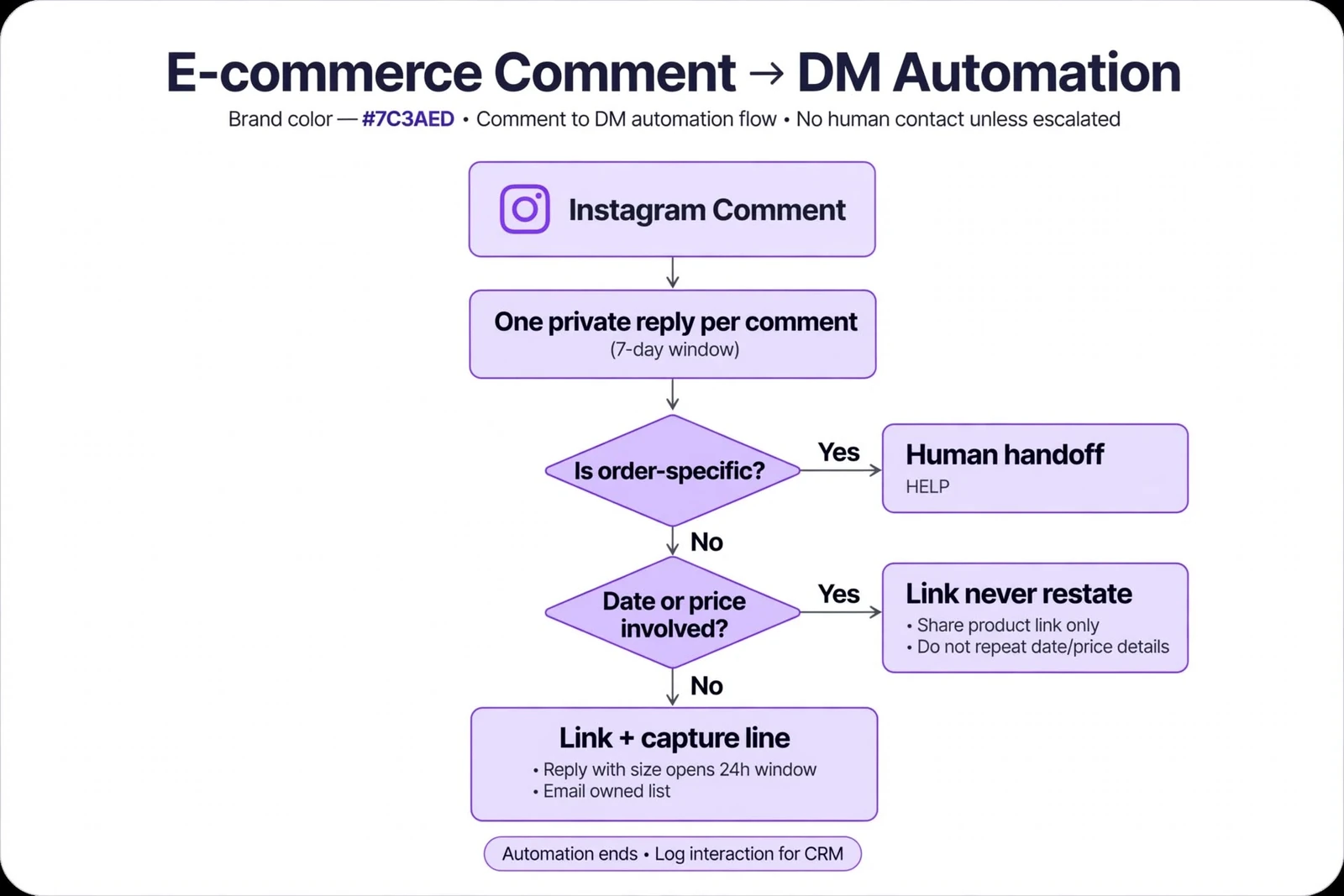
How one product comment becomes an order
The automation answers the buyable questions and hands the order-specific ones to a person. The rule that keeps it safe: never restate a delivery date or a price in a DM — link to the page that carries it, because a page can be corrected in a minute and a DM sent to four hundred people can’t be recalled.
Product questions and shopping links: 6 templates for Instagram shopping
#1 · SHOP — The product link
SHOP
{Hi|Hey} {{first_name}}! Here's the exact one from the post → [link]. Sizes and colours are all on that page.“Reply with your size and I'll tell you what's in stock.”
#2 · LINK — The specific item
LINK
{Sending it now|Straight over} {{first_name}} — direct link to that item → [link]. It's the second photo in the post.“Want the rest of the set? Reply SET.”
#3 · PRICE — Price and shipping
PRICE
{Hey|Hi} {{first_name}}, price, shipping cost and delivery window are all on the product page → [link]. Nothing is added at checkout that isn't shown there.“Shipping outside the US? Reply with your country.”
#4 · SIZE — Size guide
SIZE
{Got you|Here it is} {{first_name}} — full size chart with real measurements, not just S/M/L → [link].“Reply with your usual size in another brand and I'll compare.”
#5 · COMPARE — Two products compared
COMPARE
{Hi|Hey} {{first_name}}! Side-by-side of both → [link]. The difference is the fabric weight, and it matters more than the photos suggest.“Tell me what you'd use it for and I'll pick one.”
#6 · BUNDLE — The bundle
BUNDLE
{Just sent|On its way} {{first_name}} — the bundle page → [link]. Buying the three together is cheaper than separately; the maths is on the page.“Want to swap an item in the bundle? Reply and a person will sort it.”
Launches, drops and restocks for D2C brands: 6 templates
#7 · DROP — Launch waitlist
DROP
{Hey|Hi} {{first_name}}! Waitlist for the drop → [link]. Launch date and pricing are on the page, no surprises.“Reply with your size and I'll flag it when it lands.”
#8 · RESTOCK — Back in stock
RESTOCK
{Straight over|Got you} {{first_name}} — restock alert → [link]. Last run sold through quickly.“Want to join the restock list? Drop your email 👇”
#9 · PREORDER — Pre-order
PREORDER
{Hi|Hey} {{first_name}}, pre-order page → [link]. The expected ship window is stated there — read it before you order, it's later than a normal order.“Questions about the timing? Reply and a person will answer.”
#10 · LAUNCH — Launch-day reminder
LAUNCH
{Here it is|Sending now} {{first_name}} — the launch page with the exact time it opens → [link].“Want launch news on our list? Drop your email 👇”
#11 · EARLY — Early access
EARLY
{Got you|Just sent} {{first_name}} — early-access link → [link]. It opens before the public page.“Reply DONE once you're in and I'll add you to the next one.”
#12 · SOLDOUT — Sold out
SOLDOUT
{Hi|Hey} {{first_name}}! That one's gone — here's what's closest and what's coming back → [link].“Reply with the item you wanted and I'll tell you if it's returning.”
Discount codes and first-order offers: 5 templates
#13 · CODE — Discount code
CODE
{Hey|Hi} {{first_name}}! Code and the link → [link]. It's applied automatically if you use that link.“Want future codes on our list? Drop your email 👇”
#14 · WELCOME — First-order offer
WELCOME
{Sending it now|Here you go} {{first_name}} — first-order link → [link]. Terms and the expiry are on the page.“Reply if it doesn't apply at checkout and a person will fix it.”
#15 · SAVE — Multi-buy
SAVE
{Hi|Hey} {{first_name}}, the multi-buy page → [link]. The saving is per item, and it's shown before you pay.“Reply with what you're buying and I'll say whether it's worth it.”
#16 · SHIP — Free-shipping threshold
SHIP
{Got you|Straight over} {{first_name}} — shipping thresholds and delivery estimates by region → [link]. Estimates, not promises.“Need it by a date? Reply with the date.”
#17 · VIP — Repeat customer
VIP
{Just sent|On its way} {{first_name}}! Returning-customer page → [link]. It stacks with nothing else, which is the honest version.“Ordered before? Reply and I'll check what applies.”
Order status, sizing and post-purchase: 5 templates

#18 · TRACK — Order tracking
TRACK
{Hi|Hey} {{first_name}}! Track any order here → [link]. You'll need the order number from your confirmation email.“Can't find it? Reply and a person will look it up.”
#19 · FIT — Fit help
FIT
{Hey|Hi} {{first_name}}, fit notes for that piece — how it runs, and what to do between sizes → [link].“Reply with your measurements and a person will answer.”
#20 · CARE — Care instructions
CARE
{Straight over|Got you} {{first_name}} — care guide → [link]. The wash temperature is the part people skip.“Want more care tips on our list? Drop your email 👇”
#21 · RETURN — Returns
RETURN
{Here it is|Sending now} {{first_name}} — returns and exchanges, with the window and who pays postage → [link].“Already past the window? Reply and a person will look at it.”
#22 · HELP — Human handoff
HELP
{Hi|Hey} {{first_name}}! A person is picking this up — usually within a few hours during the week.“No link — this template exists so the automation never guesses at an order-specific answer.”
Reviews, UGC and building an audience you own: 4 templates
#23 · REVIEW — Review request
REVIEW
{Hey|Hi} {{first_name}}! If it's arrived, here's where to leave a review → [link]. Say what you actually thought — a critical one is as useful to us as a good one.“Anything wrong with the order? Reply first and we'll fix it.”
#24 · PHOTO — UGC permission
PHOTO
{Got you|Just sent} {{first_name}} — if you're happy for us to repost your photo, reply YES and we'll credit you.“Prefer we don't? Reply NO and nothing happens.”
#25 · GUIDE — Buying guide
GUIDE
{Hi|Hey} {{first_name}}! The buying guide — what to pick for what, in plain language → [link]. No product pushed on page one.“Want new guides on our list? Drop your email 👇”
#26 · NEWS — Newsletter
NEWS
{Sending it now|Here you go} {{first_name}} — restocks and drops go out by email before they go on the grid → [link].“Drop your email 👇 to join the list.”
Where these flows fit in a store’s week
Twenty-six templates is a library, not a to-do list. In practice a store runs four or five of them at a time, and which four changes with what’s on the grid that week.
- A normal product post. SHOP or LINK on the caption, SIZE as the second keyword for the fit questions that always follow. Two flows, and they cover most of the thread.
- A Reel that outperforms. The one that reaches beyond your followers brings people who have never seen the brand. COMPARE and GUIDE do better here than a bare product link, because the comment is closer to what is this than where do I buy it.
- Drop week. DROP before, LAUNCH on the day, SOLDOUT the moment inventory goes. The third one is the flow most stores skip and the one that recovers the most — a sold-out post keeps collecting comments for days after the product is gone.
- A restock. RESTOCK, with the email line switched on. Everyone who comments here has already tried to buy once.
- Any week at all. TRACK and HELP running quietly in the background. Order-status questions arrive whether or not you posted, and they’re the ones that turn into a bad review when nobody answers.
The first four to set up, in order
If this is day one, resist building all twenty-six. The order below gets a store to something working in an afternoon.
- 1. SHOP, on your best-selling product post. Not the newest post — the one that still gets comments. You want a flow firing today, not on your next upload.
- 2. SIZE or FIT, as the second keyword. Whatever the second-most-asked question is in your comments, that is flow two. Read your last twenty posts and it will be obvious.
- 3. TRACK, in the bio. “DM me TRACK for order status” costs you nothing and takes the highest-volume, lowest-value question out of your inbox permanently.
- 4. RESTOCK or DROP, whichever comes first. This is the one that starts building a list instead of just answering questions.
Only after those four are running is it worth adding the post-purchase set. For the full setup on a working store account see the D2C brand walkthrough, and for when to publish the drop post, the posting-time data by day.
Turning one comment into a repeat customer
The DM is not the end of the flow, and the stores that get the most out of this treat it as the first step of three.
Step one is the answer. The link, the size chart, the tracking page — whatever they asked for, delivered in the first message, because Instagram only gives you one. A flow that says “sure! check your DMs 😊” and nothing else has spent the only message it had.
Step two is the reply. Every template above ends with a line designed to earn one, and that is not decoration. Their reply is what opens the 24-hour window — before it, you have one message; after it, you have a conversation. “Reply with your size” works better than “let me know if you have questions” for exactly this reason: it names the thing to type.
Step three is the address. A follower is rented and an email address is owned. The templates with an email line — RESTOCK, LAUNCH, CODE, CARE, GUIDE, NEWS — are the ones that convert a moment on the grid into something that survives an algorithm change. In-DM capture puts that step inside the conversation rather than behind a link, which is where most of the drop-off happens.
Three rules specific to ecommerce flows
- Never let an automation state a delivery date or a price. Link to the page that carries it. A page can be corrected in a minute, and a DM sent to four hundred people cannot be recalled.
- One keyword per post. Two keywords in one caption splits the thread and reduces both. Run two posts instead.
- Add common misspellings as extra keywords. “shp” and “shpo” appear under every product post, and near-misses are usually the most motivated buyers in the thread.
The platform-level rules — one reply per comment, the seven-day window, spintax, one link, no shorteners — are in Meta’s three rules on comment replies.
What this costs
BuzzWire is free forever — unlimited automations, no contact caps, one Instagram account, every commenter answered at the pace Instagram expects. Free DMs carry a “⚡ Automated with BuzzWire.io” badge. Pro at $9.99/mo or $79/yr removes it and adds in-DM lead capture — the email line in templates 8, 10, 13, 20, 25 and 26 — with CSV export, plus Follow Gate.
Two honest limitations. It captures and exports email addresses but does not send email — it sits in front of your email platform, not instead of it. And it’s Instagram only; if you need these flows on WhatsApp too, a multi-channel tool is the comparison to read. Safety mechanisms are on the compliance page; keyword replies in the DM inbox are covered on the auto-reply page; the rest is on features.
FAQ
Will comment-to-DM automation get my store’s account banned?
No tool can promise that — Instagram controls enforcement. What you can check is mechanism: the official Graph API rather than your password, smart pacing so the same automation never repeats to the same person, varied wording, paced delivery, STOP honoured, one link per DM, no shorteners.
Which post should I put the first keyword on?
Your best-selling product post, not your newest one. You want the flow live on something that is already collecting comments today.
What happens if someone types the keyword wrong?
They get nothing unless that spelling is a keyword, which is why every setup should add common misspellings as extra keywords. "shp" and "shpo" are near-misses from people who are actively trying to buy, and losing them is the most expensive mistake on this page.
How many automated DMs can I send per comment?
One. That’s a rule Meta sets, not a plan limit, which is why every template delivers the thing in message one. Detail in the pillar guide’s constraints section.
Does this connect to Shopify?
Not as a catalogue integration. These flows send people to product, collection and tracking URLs on whatever platform your store runs on, which is why every template links rather than quotes.
Where are the templates for other niches?
The full template library lists every pack, and these scripts port to any tool that supports spintax.
Start a store automation free
Pick a template, swap in your product link, and go live in minutes.